


Since release 2026.1.11, we have introduced a new format for our release notes. You can now find all updates of the Thinkwise Platform, Indicium and the Universal UI in one release blog. This supports our full-stack approach and provides a better overview of the changes in each release.
This release introduces significant breaking changes to the data model, affecting the dynamic model, business logic, and validations. These changes are included as preparation for the upcoming Thinkwise Platform 2026.2 release on the 15th of June.
Hello everyone,
A major highlight of this release is the new Custom components screen in the Software Factory. Custom components can now be uploaded as a .zip file and stored directly in the database, making them available in containerized deployments too. This removes the previous dependency on hosting custom components alongside the Universal UI, significantly broadening where and how custom components can be used.
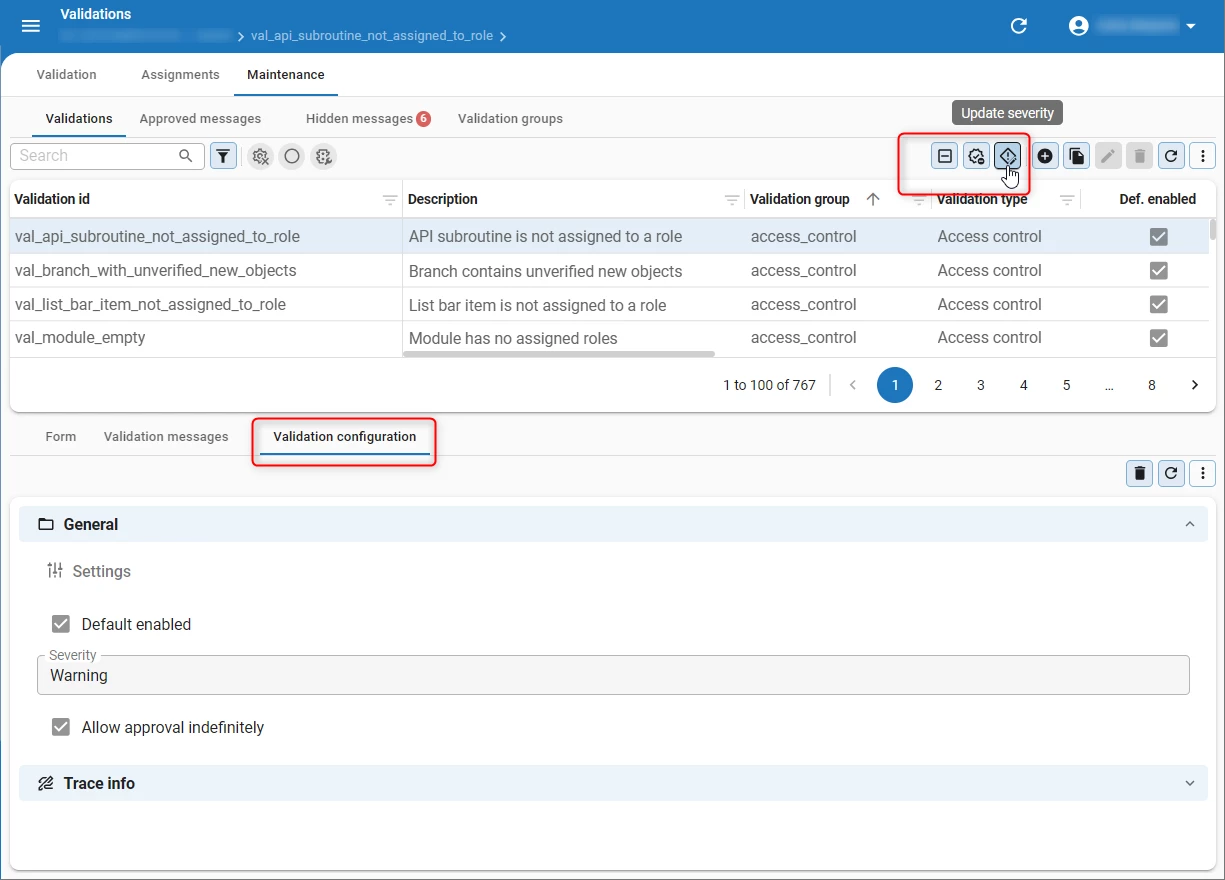
In the Software Factory, you can now configure validations from base models. The Default enabled, Severity, and Allow approval indefinitely values can now be updated for validations that originate from a base model, giving you more control over the validation behavior in your work model without losing the connection to the base model.
This release also brings significant improvements to the Universal UI, with an expansion of the offline functionality. Users can now access subjects offline, including viewing tables and executing tasks. This provides more flexibility in how and when users can work in an application, even without an internet connection.
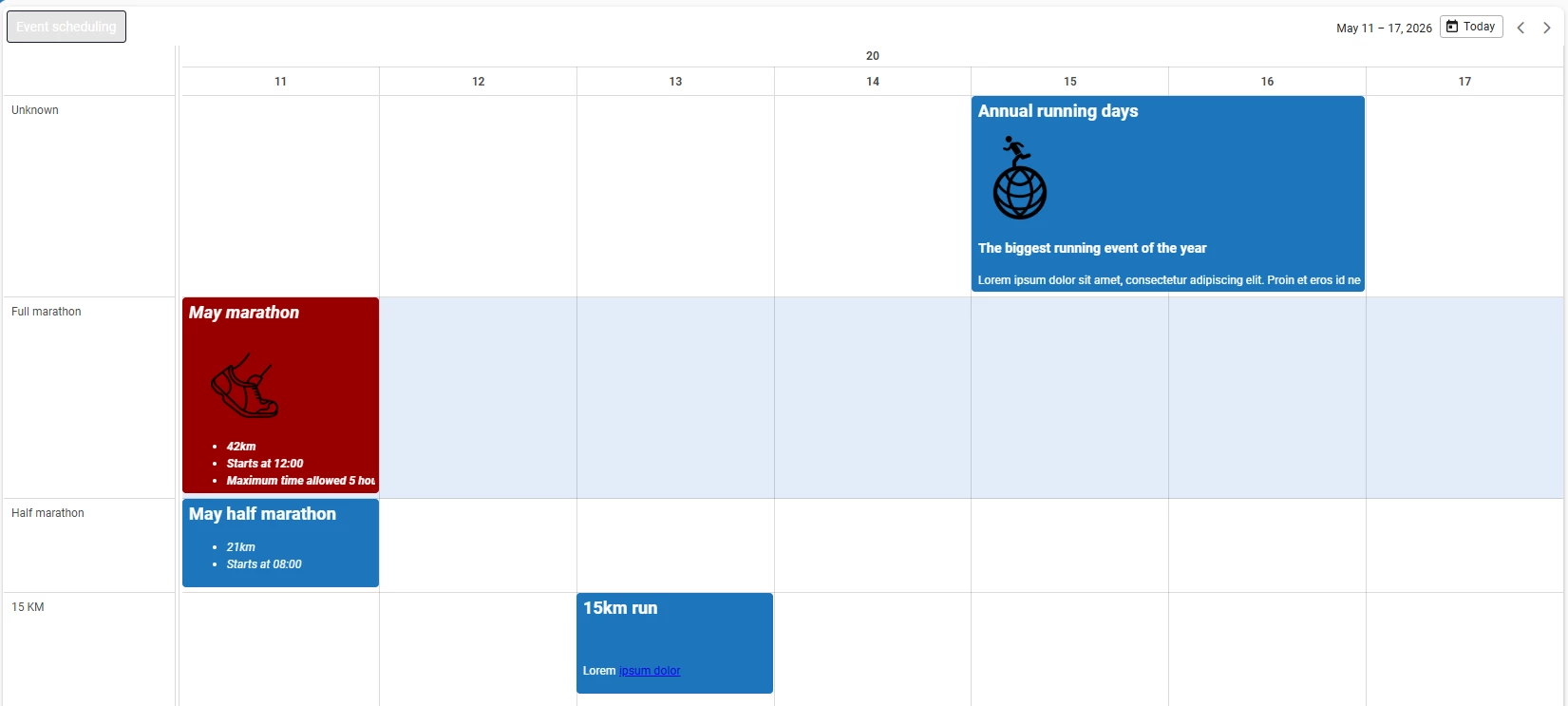
The Scheduler has also received notable updates. Activities and tooltips can now display formatted text, including bold titles, icons, bullet lists, and hyperlinks. Additionally, sliding pagination for Quarter and Month timescales now shows extra context at the start of the view.
This release includes several preparations for the upcoming Thinkwise Platform 2026.2 release. In the Software Factory, the data model has been updated in preparation for multiple RDBMS type support. The Slow query log now replaces data values with placeholders to prevent sensitive data from being written to the log. Check the breaking changes and data model changes to ensure a smooth upgrade.
This is a short-term support (STS) release of the Thinkwise Platform. STS release support expires as soon as a new release is made available. For example, support for version 2026.1.12 ends when version 2026.1.13 is released. See our Lifecycle policy for information about supported versions
Contents
Before you upgrade
- Features for the Software Factory and the Intelligent Application Manager are only compatible with this STS version of the Thinkwise Platform.
- Indicium and Universal UI features are backwards compatible with previous Thinkwise Platform versions, unless otherwise noted.
Demo and download
Breaking
Thinkwise Platform 2024.1 - End of Service Life
breaking Universal UI
As per our Lifecycle policy, support for by the Universal UI for Thinkwise Platform version 2024.1 has ended and will receive no further updates. Upgrade to Thinkwise Platform 2024.2 or higher.
Data model changes in preparation for multiple RDBMS types
breaking Software Factory
The Software Factory data model has been updated to prepare for multiple RDBMS type support. This feature is planned for the Thinkwise Platform 2026.2 release.
The following areas are impacted:
-
Dynamic model: Query fields have moved from their original tables to
_query-suffixed tables.Verify all Dynamic model code to ensure query fields are read from and written to the correct table.
Example: A query previously written to
tab_prefiltermust now targettab_prefilter_query. -
Validations: Any validation that references a query field in a table must be updated to reference the
_query-suffixed version of that table. -
Business Logic: Control procedures that use SQL assignments with the Delete or Fully controlled strategy and insert into any of the following tables must now include
rdbms_typein the insert:-
prog_object
-prog_object_parmtr
-prog_object_item
-prog_object_item_parmtrWhen using the
Stagedstrategy, the Software Factory itself processes the data from the staging tables into the model, allowing the Software Factory to fill in therdbms_typefield for you.Use the following values for
rdbms_type:Value RDBMS type 0SQL Server 1DB2 iSeries 3Oracle 4PostgreSQL
'Slow query log' uses placeholders for data values
breaking Indicium
The Slow query log no longer stores data values in log entries for Thinkwise Platform 2026.1.14 and older. To prevent sensitive data from being written to the log, values are now replaced with ?. For example, filter values, inserted record values, and task parameter values are all logged as ?. The structure of the database statement remains intact, so you can replace the ? placeholders with actual values for troubleshooting.
You can control whether the Slow query log stores data values Thinkwise Platform 2026.1.15 onwards. You can do this by enabling or disabling the checkbox Include data in slow query log in the Intelligent application manager (menu Settings > Global settings > group Logging).
The Database Event Log in the Debug Center is not affected by this change. It continues to show data values, as it is only visible to the current user for their own session and is not backed by persistent storage.
Re-enable offline availability with extended property
breaking Universal UI
As a result of making subjects and subject variants available offline, we have added an extended property to toggle this functionality. If you have set up offline availability, set the extended property AllowOfflineExperience to Yes to enable it. If you do not set this extended property, subjects will not be available offline after the upgrade.
Check process flows with 'Open document' action
breaking Universal UI
As a result of updating the behavior of the Open document action with Open as set to Floating, some existing process flows may now behave differently after this release.
Check all existing process flows that use the Open document action (menu User Interface > Process flows) with the input parameter Open as set to Floating to ensure they still behave as expected after the upgrade.
'Grid column width' now displays as configured
breaking Universal UI
Previously, the value entered in the field Grid column width did not match the width being displayed in the Universal UI. A default grid padding of 8px (or 16px in comfortable mode) was added to every column's width, which meant the configured width was not the actual width of the column. Now, columns have the same width as configured in the field Grid column width.
This fix may introduce a breaking change for your applications. To ensure everything continues to work correctly:
- Check all screens in your applications if data is still displayed correctly after the upgrade.
- If necessary, adjust the Grid column width for your grids to account for the new behavior.
Read-only password fields now show action button
breaking Universal UI
Previously, the action button for password control fields was only shown in edit mode, regardless of the setting for Show action button (menu Data > Domains > tab Form). Now, password control fields adhere to this setting.
The default value for Show action button is Always. This means the action button will be shown for password fields in read-only mode after upgrading. If you do not want this behavior, set Show action button to Never for the domain.
New and changed
User interface - Added 'Custom components' screen
new Software Factory Universal UI
Custom components let you extend your application with functionality specific to your organization that is not part of the standard Thinkwise component set. Previously, you could add custom components by placing them in a subdirectory of the Universal UI and referencing that location as a URL segment. In Thinkwise Cloud, this is not possible because running your own containers is not supported.
To address this, a Custom components screen (menu User interface > Custom components) has been added to the Software Factory. This screen acts as a repository where each custom component can be uploaded as a .zip file and stored in the database, similar to how icons are managed. For each custom component, you can provide:
- A Description.
- A Default entry point, which specifies the file inside the
.zipfile used to start the custom component (for example,index.html).
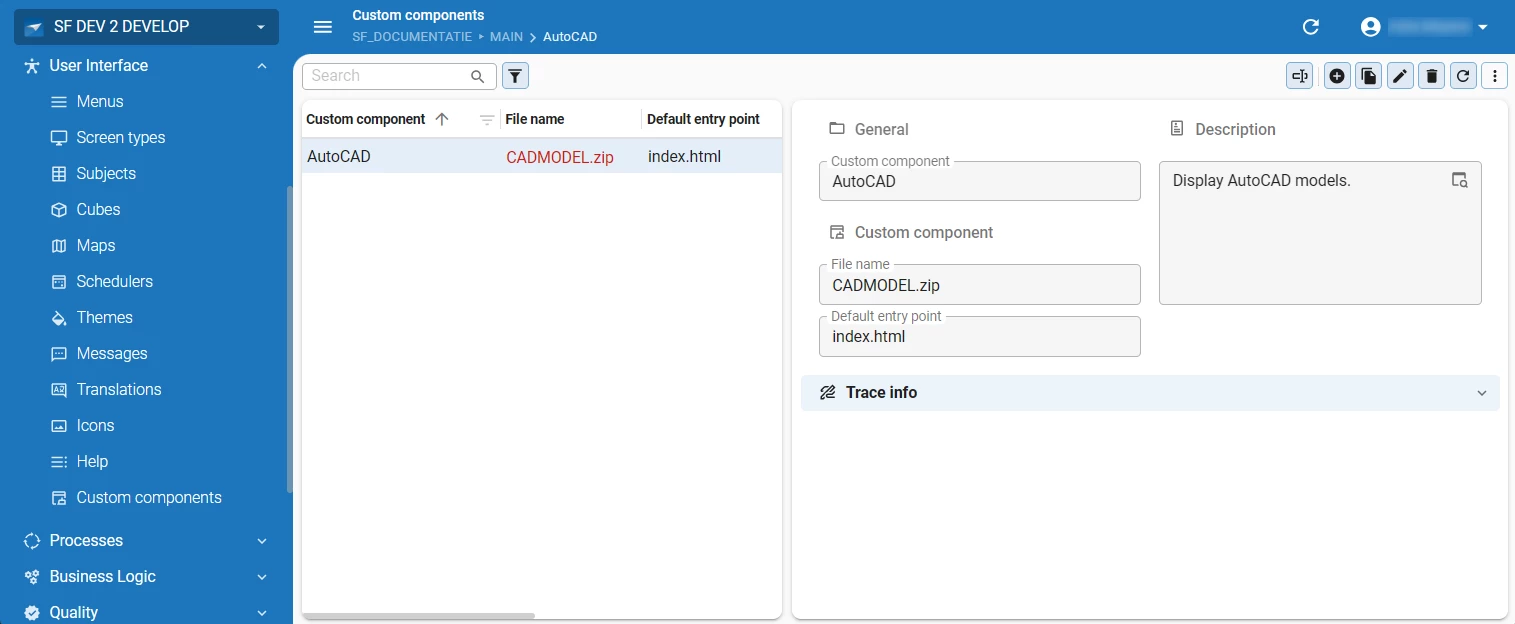
The Usage tab shows which tables and table variants use the custom component.
At table and table variant level, you can set the Custom component source to Model or External:
- Model — uses the new repository. Select a custom component via a lookup and specify the Entry point. If the selected custom component has a default entry point defined, it is applied automatically. This can be overridden. You can use
{metasource}and{application}variables in the entry point to refer to different versions of the custom component. - External — uses the existing URL-based approach. When you upgrade, sources for existing custom component references are automatically migrated to External.
At table variant level, you can override the table configuration. This includes whether a custom component is used, which source is applied, and which component is selected. This way, different variants of the same table can use different custom components without affecting each other.
Quality - Configure validations from base models
Community idea new Software Factory
You can now update the Default enabled, Severity, and Allow approval indefinitely values for validations that originate from a base model. You can update these values using the following tasks (menu Quality > Validations > tab Maintenance):
- Enable/disable validation
- Enable/disable allow approval indefinitely
- Update severity
Once you have manually updated a validation, the updated value is shown in the tab Validation configuration. You can filter on the prefilter Has different configuration to easily find validations that have been updated.
Custom values are set within the context of the current model and branch, and are not overwritten when the corresponding base model is generated or merged into the work model. They also remain in place when the full definition of the work model is generated. If you want to remove custom values for validations, you can Delete them in the tab Maintenance > tab Validation configuration.
As part of this update, a section of the Thinkwise guideline validations has been added to the Validations base model in the Software Factory. This includes validations for column names, domain names, primary key columns, references, table names, screen types, domain controls, icons, prefilters, tab containers, tasks, reports, and control procedures.
Added extended property 'MaxStageRowLimit'
new Indicium
Currently, there is a default limit of 5000 records for actions performed in Indicium, such as deleting records or executing tasks. The extended property MaxStageRowLimit has been added to allow you to increase this default limit. The property can be set with the following values:
- -1: Actions can be performed on an unlimited number of rows.
- > 5000: The limit is set to the configured number of records.
- Not set or < 5000: The default limit of 5000 records is enforced.
As part of this update, the error message shown when the limit is exceeded has also been improved. Instead of the generic validation_failed message, the error now indicates that the maximum allowed number of rows has been exceeded.
The 5000 record limit is a safeguard against performance and stability issues. Increasing or removing this limit can cause long processing times or crashes. Use this property with caution and monitor your application's performance.
Updated email library
change Indicium
The email library used by Indicium has been updated to the latest version. Sending emails through the email connector and the Forgot your password link continues to work as before.
Subjects now available offline
new Universal UI
We have expanded the offline functionality in the Universal UI. Users can now access subjects offline, allowing for more flexibility in how and when they can work in an application.
Users can:
- View tables and table variants in a subject
- Execute table tasks
- Execute menu tasks
To set up offline availability, set the extended property AllowOfflineExperience to Yes.
To make a table or a table variant available offline, select the checkbox Offline available in the menu User Interface > Subjects > tab Default/Variants > tab Settings > tab Components > group Offline. See also, Offline availability and Offline available task for more information.
For offline available tasks, configure the following settings:
- The tasks cannot contain lookups.
- The tasks will check for mandatory fields but make no other validations.
- The tasks will not execute application logic for parameter input. This will be done later when the user is online again.
- The task control procedures should accept all input without throwing errors since a user cannot fix these when synchronizing afterward.
- All parameters filled through the task should set to Hidden.
If you use a task variant or table variant, configure the following settings:
- All prefilters must be set to Hidden.
- The following permissions should be disabled:
- Table tasks, other than the offline available task, should be disabled.
- Reports should be disabled.
- Paging should be disabled.
- Lookups should be hidden (clear the checkbox Show look-up, see Use a column as a lookup.
- Drag-drop should be disabled (clear the checkbox Def. drag-drop enabled, see Enable drag-drop in a grid by default.
- The subject can not be used in a cube, map or Scheduler.
In an upcoming release, these settings will automatically be disabled when you create a subject variant.
This feature introduces some breaking changes, see Re-enable offline availability with extended property.
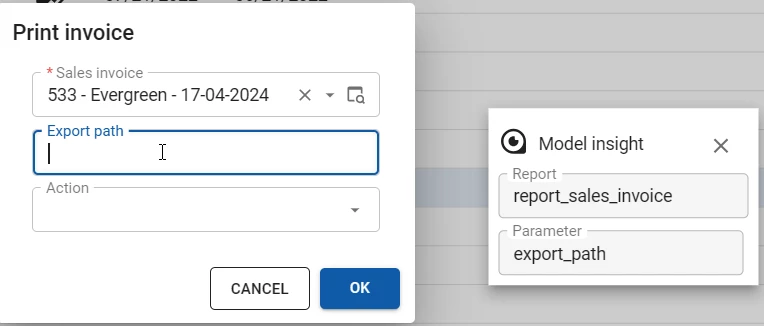
Model insight now shows task and report names
new Universal UI
When selecting fields belonging to a task or report, Model insight now shows the task or report name in a dedicated field. This makes it easier to see which fields belong to a specific task or report. Additionally, parameters for tasks and reports are now labeled Parameter instead of Column.
Improved sliding pagination for the Scheduler
change Universal UI
Sliding pagination in a Scheduler provides a sliding window of time around the current date and time. Previously, only the Year timescale showed additional context at the start, with the Scheduler view showing a month before the current month. For Quarter and Month timescales, no extra context was shown at the start of the view.
We have now made additional context available for Quarter and Month timescales. The amount of context shown at the start depends on the highest timescale:
- Quarter or Month: an extra week is shown at the start of the view.
- Year: an extra month is shown at the start, followed by the full year or years.
As part of this update, we fixed an issue where adding a month to the start of the view caused the last month of the final year to be removed.
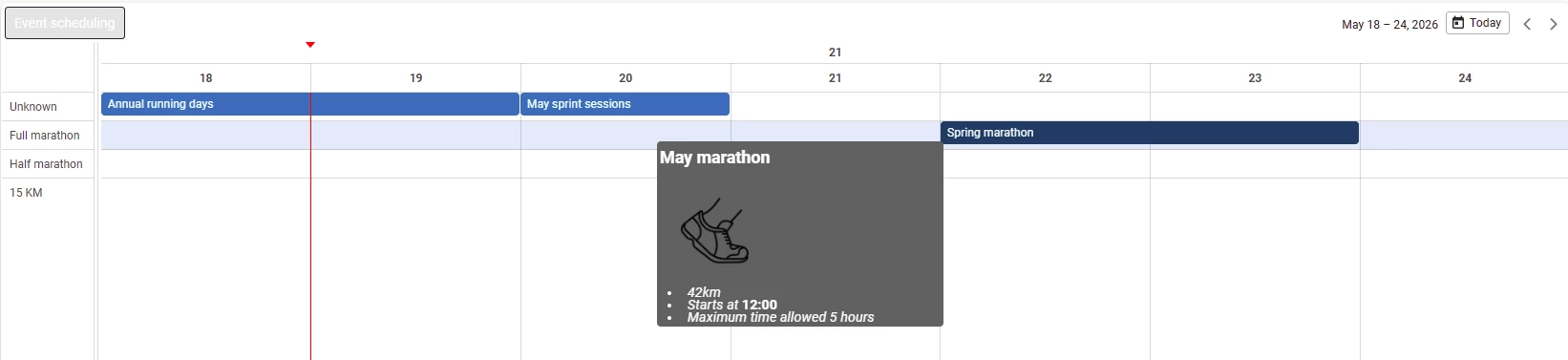
Add text formatting to Scheduler activities
change Universal UI
Previously, activities in a Scheduler were always displayed as a single line of plain text.
You can now add text formatting to activities and their tooltips in a Scheduler, as well as multiple lines of text. This allows for more flexibility in the content and appearance of activities in a Scheduler.
- To add formatting to an activity, select a domain with a Multiline or HTML control as the Title column of the activity (menu User interface > Schedulers > tab Tables).
- To add formatting to a tooltip, select a column with an HTML control as the Tooltip column of the activity (menu User interface > Schedulers > tab Default/Variants > group Activity linked columns).
See Set up a Scheduler for more information.
Multiline and HTML content in a Scheduler activity has no maximum height by default. Activities expand vertically to fit all content. To limit the height of activities, wrap the content in an additional <div> element with a max-height style property. This can be done using a view template or a Calculated column with a HTML control:
SELECT
  '<div
    class="activity-wrapper"
    style="max-height:200px; overflow:hidden;"
  >
    <style>.activity-wrapper h2 { margin: 0; }</style>' +
  t1.event_html +
  '</div>'
If multiline or HTML content is used in a Scheduler activity, conditional layout such as font size, strikethrough, and underline will not be applied to the activity.
Improved behavior of 'Open document' action
change Universal UI
Previously, when a process flow used the Open document action with Open as set to Floating, the process flow stopped executing after opening the floating document.
The process flow now continues executing inside the floating document. This can be used, for example, to jump to a specific record or to filter the data.
When the process flow triggers the Close document action, the floating browser window closes and execution continues in the document behind.
The document behind the floating document is not locked, which means the user may have changed or closed it in the meantime. To avoid unexpected behavior, open the subject from scratch and store the active content in process flow variables. Alternatively, reactivate the document before continuing the process flow.
This change introduces some breaking changes for existing process flows that use the Open document action with Open as set to Floating. See Check process flows with 'Open document' action for more information.
Improved behavior of 'Favorites' and 'Start objects'
change Universal UI main administrator
We have improved the behavior of Favorites and Start objects to better reflect their different purposes.
Previously, you could configure Start objects for a user in IAM. These objects would automatically start when opening the application. We have renamed start objects for a user to Favorites and changed its behavior. Menu items marked as Favorite are no longer automatically started. Instead, the Favorites group is now expanded by default.
Administrators can still configure Start objects for user groups in IAM. These still work as before and start automatically on startup. To align with their behavior, these objects are no longer shown in Favorites.
Invalid date no longer automatically corrected
change Universal UI
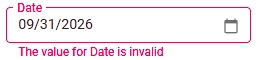
Previously, when a user would type an invalid date in a date field (for example, 02-30-2026), the Universal UI would automatically correct this to a valid date (in this case, 03-02-2026). This could occur without the user noticing, potentially leading to incorrect dates being saved. Now, if the user enters an invalid date, the field is highlighted with a red border and an error message is shown to indicate that the date is invalid. The date must be corrected before the user can save the form.
Updated keyboard shortcut for column header filtering
change Universal UI
Pressing Ctrl + Enter now applies the filter and closes the filter popup when using Excel-style filters in a grid column header. Filters that already closed using Enter alone, such as date time filters, can still be applied with or without pressing Ctrl.
Fixed
Software Factory and Intelligent Application Manager
DB2In DB2 models, each code file previously started with aset schemaandset pathstatement. These statements were always based on the database configured in the default runtime configuration, even when connecting through a different runtime configuration. As a result, code could unintentionally be executed against the wrong database. This has been fixed by removing theset schemaandset pathstatements from the start of code files. Theprovision_dbprocess action during installs and theapplication_connectorprocess action during upgrades already set the correct schema and path, making these statements redundant.- The task Update Active Directory group in IAM (menu Authorization > User groups) assigned the old language code for English to newly imported users from the active directory group. This has been fixed. New users will receive the
en-USlanguage code. - When setting up a custom action bar, including and then excluding an action via edit-in-grid could clear mandatory fields. This prevented you from saving the record. This has been fixed.
- Previously, setting a tab page icon required uploading a file separately. You can now select it from the central repository in the Software Factory, similar to other places in the Software Factory where icons are used.
- The task Assign rights in Roles is now a primary action (menu Access control > Roles).
Indicium
- If an expression field was set to Editable and Mandatory, the mandatory check was not performed. This has been fixed.
Universal UI
For grids:
- When filtering in a grid column header, translation objects of domain elements were not displayed correctly. This has been fixed.
- When filtering in a grid header that used a lookup with domain element translations, the translations were not displayed correctly. This has been fixed.
- Fixed an issue where switching rows in a grid while the form was in edit mode and Auto-save was enabled, the form would not update to display the data of the newly selected row.
- When switching between rows in a grid, the Universal UI would start loading data for a detail tab before context logic had finished executing. If the context logic caused the active tab to become hidden, the data request could be processed against an invalid context, resulting in data-type errors. This has been fixed.
For pivot grids:
- When all categories or rows in a pivot grid were expanded by default, the tree expanded slowly on screen. We have optimized the performance of pivot grids to fix this issue.
- Fixed an issue where the Universal UI could crash if you sorted on a date (part) in a pivot grid.
For Schedulers:
- Font size, strikethrough, and underline font styling are now applied to Scheduler activities. Scheduler activities containing HTML content will not apply these decorations or font sizes.
- Scheduler events now return to their original position, if a user attempts to drag items that have no update permissions.
- When a hierarchical Scheduler had an ID containing double quotes (
"), expanding the corresponding level would cause the Scheduler to freeze. This has been fixed.
For process flows:
- Fixed an issue where a process flow would stop after using the Close all documents process flow action.
- The Change filters process action now no longer hangs when used in a process flow on a document that starts empty with filter.
Other fixes:
- Fixed an issue where resizing the browser window to a smaller size and then back to a larger size, could cause task popups containing a Code diff editor control to slowly grow back to their original size instead of resizing instantly.
- A task popup containing a Signature control could shrink in size after opening. This has been fixed.
- Improved the Treeview performance for large datasets.
- Model insight is now deactivated if the session expires or the user logs out.
- When a request to Indicium fails due to a URL path segment longer than 260 characters, an error message is now displayed:
- For users: 'The request URL contains segments which are too long. Please contact your system administrator.'
- For developers: 'The request URL contains segments which are possibly too long. The longest segment was [segment length].'
- Trailing whitespaces are now stripped from lookup values in Form. This aligns with the default display behavior of values in the Universal UI.
- The Maps component now adheres to the zoom limits defined per layer and overlay, so zooming in and out stays within the range intended for each map style. When a map opens or is navigated to via a process action, the zoom level is automatically adjusted to stay within the supported range for the active layer.
- If the data used for an Import contained a period ('.'), the data preview would not display the data correctly. This has been fixed.
- When uploading a file or image through a task that had a confirmation pop-up, a 422 error occurred and the file was not uploaded. This has been fixed.
- The Switch branch did not automatically execute in the Software Factory in the Universal UI. This has been fixed.
Data model changes
Data model changes for the Software Factory and IAM meta-models are listed here. This overview can be used as a reference to fix dynamic control procedures, dynamic model code or custom validations after an upgrade.
Changes Software Factory
Table changes
| SF - From table | SF - To table |
|---|---|
| - | branch_rdbms_type |
| - | col_data_sensitivity_query |
| - | col_query |
| - | cube_field_query |
| - | custom_component |
| - | data_migration_col_query |
| - | data_set_query |
| - | dom_input_constraint_query |
| - | dom_query |
| - | dttp_conv |
| - | indx_query |
| - | message_broker |
| - | message_broker_message |
| - | message_broker_message_input_parmtr |
| - | message_broker_message_mqtt |
| - | message_broker_message_mqtt_input_parmtr |
| - | message_broker_message_mqtt_output_parmtr |
| - | message_broker_message_mqtt_usr_property |
| - | message_broker_message_output_parmtr |
| - | message_broker_mqtt |
| - | message_broker_mqtt_configuration |
| - | message_broker_mqtt_version |
| - | model_vrs_data_migration_col_query |
| - | process_action_message_broker_message_input_parmtr |
| - | process_variable_query |
| - | report_parmtr_query |
| - | report_variant_parmtr_query |
| - | tab_check_constraint_query |
| - | tab_data_col_query |
| - | tab_prefilter_query |
| - | tab_query |
| - | tab_variant_col_query |
| - | task_parmtr_query |
| - | task_variant_parmtr_query |
| - | unit_test_query |
| - | validation_configuration |
| dttp_conv | - |
Column changes
| SF - Table | SF - From column | SF - To column | Mandatory | Default value |
|---|---|---|---|---|
| branch | db_prog_lang_id | db_prog_lang_id | 0 | - |
| code_file | - | rdbms_type | 1 | - |
| code_file_code | - | rdbms_type | 1 | - |
| code_search_result | - | pk_col_5 | 0 | - |
| col | default_value_query | - | - | - |
| col | view_col_id | - | - | - |
| col | calculated_field_query | - | - | - |
| col_data_sensitivity | expression | - | - | - |
| cube_field | formula | - | - | - |
| data_migration_col | default_value_query | - | - | - |
| data_migration_col | history_default_value_query | - | - | - |
| data_set | preparation_query | - | - | - |
| dom | prog_lang_id | - | - | - |
| dom | dttp_id | - | - | - |
| dom | length | - | - | - |
| dom | prec | - | - | - |
| dom | dttp | - | - | - |
| dom | user_defined_dttp | - | - | - |
| dom | allocate_length | - | - | - |
| dom | min_value | - | - | - |
| dom | max_value | - | - | - |
| dom | default_value_query | - | - | - |
| dom_input_constraint | constraint_expression | - | - | - |
| drag_drop | - | drop_date_time_task_parmtr_id | 0 | - |
| dttp | - | rdbms_type | 1 | - |
| dttp | prog_lang_id | - | - | - |
| execute_object_code_log | - | rdbms_type | 1 | - |
| execute_object_code_step | - | rdbms_type | 0 | - |
| execute_object_code_step | - | prog_object_id | 0 | - |
| execute_source_code_step | - | rdbms_type | 0 | - |
| generate_object_code_step | - | rdbms_type | 0 | - |
| generate_object_code_step | - | prog_object_id | 0 | - |
| indx | indx_where_clause | - | - | - |
| model | rdbms_type | - | - | - |
| model_settings | fallback_appl_lang_id | fallback_appl_lang_id | 0 | en-US |
| model_vrs_data_migration_col | default_value_query | - | - | - |
| model_vrs_data_migration_col | history_default_value_query | - | - | - |
| post_sync_code | - | rdbms_type | 1 | 0 |
| process_action | - | message_broker_id | 0 | - |
| process_action | - | message_broker_message_id | 0 | - |
| process_action_output_parmtr | - | message_broker_id | 0 | - |
| process_action_output_parmtr | - | message_broker_message_id | 0 | - |
| process_action_output_parmtr | - | message_broker_message_output_parmtr_id | 0 | - |
| process_variable | default_value_query | - | - | - |
| prog_object | - | rdbms_type | 1 | - |
| prog_object_archive | - | rdbms_type | 1 | - |
| prog_object_item | - | rdbms_type | 1 | - |
| prog_object_item_parmtr | - | rdbms_type | 1 | - |
| prog_object_parmtr | - | rdbms_type | 1 | - |
| report_parmtr | default_value_query | - | - | - |
| report_variant_parmtr | default_value_query | - | - | - |
| runtime_configuration | - | rdbms_type | 0 | - |
| scheduler_view | - | day_label_format | 1 | 0 |
| screen_component | - | tab_page_icon_id | 0 | - |
| screen_component | tab_page_icon | - | - | - |
| screen_component | tab_page_icon_data | - | - | - |
| tab | - | custom_component_source | 0 | - |
| tab | - | custom_component_id | 0 | - |
| tab | - | custom_component_entry_point | 0 | - |
| tab | view_schema_id | - | - | - |
| tab | view_from_clause | - | - | - |
| tab | view_where_clause | - | - | - |
| tab | view_grp_by_clause | - | - | - |
| tab | view_having_clause | - | - | - |
| tab_check_constraint | check_constraint | - | - | - |
| tab_data_col | value_query | - | - | - |
| tab_prefilter | query | - | - | - |
| tab_variant | - | apply_custom_component | 1 | 0 |
| tab_variant | - | custom_component_source | 0 | - |
| tab_variant | - | custom_component_id | 0 | - |
| tab_variant | - | custom_component_entry_point | 0 | - |
| tab_variant | apply_custom_component_ref | - | - | - |
| tab_variant_col | default_value_query | - | - | - |
| tab_variant_scheduler_view | - | day_label_format | 1 | 0 |
| task_parmtr | default_value_query | - | - | - |
| task_variant_parmtr | default_value_query | - | - | - |
| template_prog_object_item | - | rdbms_type | 1 | - |
| template_prog_object_item_parmtr | - | rdbms_type | 1 | - |
| unit_test | preparation_query | - | - | - |
| unit_test | assertion_query | - | - | - |
| usr | - | primary_rdbms_type | 0 | - |
| write_code_files_to_disk_job_step | - | rdbms_type | 0 | - |
| write_code_files_to_disk_job_step | - | code_file_id | 0 | - |
| write_prog_objects_to_disk_job_step | - | rdbms_type | 0 | - |
| write_prog_objects_to_disk_job_step | - | prog_object_id |
Changes Intelligent Application Manager
Table changes
| IAM - From table | IAM - To table |
|---|---|
| - | branch_rdbms_type |
| - | col_query |
| - | cube_field_query |
| - | cube_field_query_dependency |
| - | custom_component |
| - | dom_input_constraint_query |
| - | expression_query_dependency |
| - | iam_message_broker_mqtt |
| - | process_variable_query |
| - | report_parmtr_query |
| - | report_variant_parmtr_query |
| - | role_custom_component |
| - | sf_message_broker |
| - | sf_message_broker_message |
| - | sf_message_broker_message_input_parmtr |
| - | sf_message_broker_message_mqtt |
| - | sf_message_broker_message_mqtt_input_parmtr |
| - | sf_message_broker_message_mqtt_output_parmtr |
| - | sf_message_broker_message_mqtt_usr_property |
| - | sf_message_broker_message_output_parmtr |
| - | sf_message_broker_mqtt |
| - | subroutine_parmtr_query |
| - | tab_prefilter_query |
| - | tab_prefilter_query_dependency |
| - | tab_variant_col_query |
| - | task_parmtr_query |
| - | task_variant_parmtr_query |
| cube_field_dependency | - |
| expression_dependency | - |
| tab_prefilter_dependency | - |
| usr_open_id | - |
Column changes
| IAM - Table | IAM - From column | IAM - To column | Mandatory | Default value |
|---|---|---|---|---|
| col | default_value_query | - | - | - |
| col | calculated_field_type | - | - | - |
| col | calculated_field_query | - | - | - |
| col | dttp_id | - | - | - |
| col | xml_dttp_id | - | - | - |
| col | length | - | - | - |
| col | prec | - | - | - |
| col | min_value | - | - | - |
| col | max_value | - | - | - |
| cube_field | formula | - | - | - |
| dom_input_constraint | constraint_expression | - | - | - |
| drag_drop | - | drop_date_time_task_parmtr_id | 0 | - |
| global_settings | - | enable_slow_query_log | 1 | 1 |
| global_settings | - | include_slow_query_log_data | 1 | 0 |
| global_settings | slow_query_threshold | slow_query_threshold | 0 | 200 |
| process_action | - | message_broker_id | 0 | - |
| process_action | - | message_broker_message_id | 0 | - |
| process_variable | default_value_query | - | - | - |
| process_variable | dttp_id | - | - | - |
| process_variable | xml_dttp_id | - | - | - |
| process_variable | length | - | - | - |
| process_variable | prec | - | - | - |
| process_variable | min_value | - | - | - |
| process_variable | max_value | - | - | - |
| report_parmtr | default_value_query | - | - | - |
| report_parmtr | dttp_type | - | - | - |
| report_parmtr | dttp_id | - | - | - |
| report_parmtr | xml_dttp_id | - | - | - |
| report_parmtr | length | - | - | - |
| report_parmtr | prec | - | - | - |
| report_parmtr | min_value | - | - | - |
| report_parmtr | max_value | - | - | - |
| report_variant_parmtr | default_value_query | - | - | - |
| scheduler_view | - | day_label_format | 0 | - |
| subroutine_parmtr | dttp_type | - | - | - |
| subroutine_parmtr | dttp_id | - | - | - |
| subroutine_parmtr | xml_dttp_id | - | - | - |
| subroutine_parmtr | length | - | - | - |
| subroutine_parmtr | prec | - | - | - |
| subroutine_parmtr | min_value | - | - | - |
| subroutine_parmtr | max_value | - | - | - |
| tab | - | custom_component_id | 0 | - |
| tab | - | custom_component_entry_point | 0 | - |
| tab_prefilter | query | - | - | - |
| tab_variant | - | custom_component_id | 0 | - |
| tab_variant | - | custom_component_entry_point | 0 | - |
| tab_variant_col | default_value_query | - | - | - |
| tab_variant_scheduler_view | - | day_label_format | 0 | - |
| task_parmtr | default_value_query | - | - | - |
| task_parmtr | dttp_type | - | - | - |
| task_parmtr | dttp_id | - | - | - |
| task_parmtr | xml_dttp_id | - | - | - |
| task_parmtr | length | - | - | - |
| task_parmtr | prec | - | - | - |
| task_parmtr | min_value | - | - | - |
| task_parmtr | max_value | - | - | - |
| task_variant_parmtr | default_value_query | - |