
Hello everyone,
We have improved the workflow when changing IAM settings by making Indicium automatically reload certain settings. In addition, we have addressed an issue that may appear when generating DevExpress reports on Azure Web Apps and fixed a bug in the Azure blob storage provider that affected several process actions.
You can read more about Indicium's features in the Indicium user manual.
Do you have any questions or suggestions? Let us know in the Thinkwise Community!
About Indicium
Two types of the Thinkwise Indicium Application Tier are available:
- Indicium Basic (EoL): for use with the Windows GUI and Mobile GUI. This basic version does not support features such as system flows and OpenID.
- Indicium: for use with the Universal GUI and via APIs. This version uses the full range of Indicium functionality.
Download Indicium release 2025.3.13 here.
Contents
New and changed
Indicium reloads IAM settings automatically
new
Previously, when certain changes were made to settings in IAM, these changes would not automatically be picked up by Indicium. It was necessary to manually restart Indicium to apply changes.
Now, it is no longer necessary to manually restart Indicium when making changes settings available in the following screens in IAM:
- menu Client apps > Client applications
- menu Settings > Web domains
- menu Settings > Global settings
Thinkwise platform version 2025.3 is required to reload settings in the background for Web domains.
Indicium automatically picks up any added, removed, or updated settings and applies them at runtime. For performance reasons, it can take up to a minute for changes in settings to take effect.
In the next release of Indicium, changes made to OpenID provider settings will receive the same treatment, removing the need to restart Indicium.
DevExpress reports on Azure
change
In some cases, reports could no longer be generated in Azure when using Azure Web Apps (Windows). After investigating the issue, we found that the child process (prockees.exe), which is used as a proxy to create reports on Azure, sometimes failed to start. This behavior was likely caused by a change on the Azure side, since the issue appeared unexpectedly. Logs indicated that the communication method used with the child process caused the crash.
If you are experiencing issues, you can switch the communication method from named pipes to sockets. To do this, add the following code to the appsettings.json file:
"Reporting": {
  "DevExpress": {
    "TransportMode": "Socket"
  }
}
Alternatively, add the following environment variable to your Azure Web App:
- Name:
Reporting__DevExpress__TransportMode - Value:
Socket
Email for two-factor authentication
change main administrator user administrator
For TOTP authentication in IAM, you could allow users to reset their TOTP device via a validation code sent by email. You could do this by selecting Allow fallback to email in IAM in the menu Authorization > Users > tab Form > group Login. This was useful in cases where users were unable to use their device for TOTP authentication.
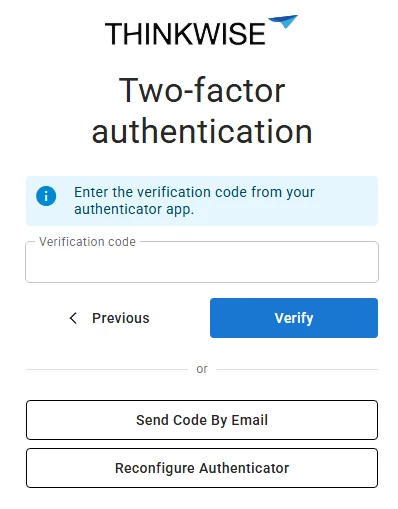
We have now extended the functionality of Allow fallback to email. Users can now use a one-time code sent by email to sign in, instead of using TOTP authentication. This option is intended for users who do not have access to their TOTP device. It should not be used as a replacement for TOTP authentication.
Users can choose between the following options on the verification page:
- Send Code by Email - sign in using email two-factor authentication.
- Reconfigure Authenticator - reset the device used for TOTP authentication.
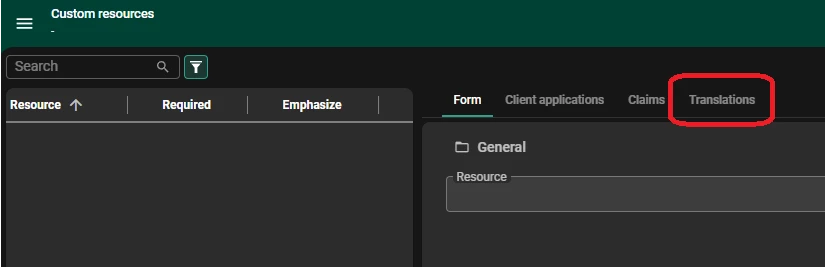
The translations for these labels can be changed to suit your organization's needs. For more information, see Translation.
Minor fixes and tasks
-
A bug in the Azure blobs storage provider caused Indicium to incorrectly list files of sub folders. This resulted in issues in several process actions that used Azure blob storage. For example, an empty zip file was received, even though the source directory was not empty. This has issue has been resolved. Regular file storage operations (i.e., via subjects and tasks) were not affected. This bug affected the following process actions:
- Email connector
- Copy Folder
- List Folder
- Zip file
- Unzip file
- Merge PDF
-
Fixed an issue where number formatting in Excel exports did not follow how they were displayed in the Universal UI.
-
DB2Previously, when using the Database connector, Indicium did not correctly handle the data typenvarchar(max). As a result, all calls to the DB2 databases failed when using this data type, since Indicium provided a length of -1, which ODBC could not process. This has been fixed. -
Indicium now correctly detects the comma decimal separator when importing a CSV file, in addition to keeping support for the dot decimal separator. Previously, comma would be removed from numbers, resulting in incorrect values being imported.