




A project manager wants to know which projects are running over budget. A colleague needs to log last week's hours across four projects. With MCP (Model Context Protocol), both just ask: one gets an answer straight from the data, the other gets the hours booked for them.
You've read plenty about MCP by now. Time to try it on a real application.
See it in action
Try it yourself!
Our Insights demo application is now available through MCP. If you have a Thinkwise Community account, and you probably do if you are reading this, you can connect to it right away with ChatGPT or Claude. A free Claude account works too.
Note: This is a demo application, so the data isn't always as realistic as in your own. You can change, insert or delete anything, but remember that everyone shares the same data. The database resets every night.
How to connect
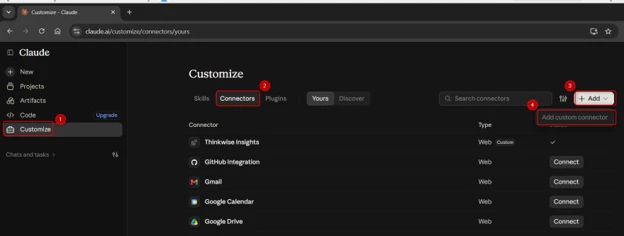
- In Claude or ChatGPT, add a Custom connector
-
Enter a name, for example Thinkwise Insights, and this URL: https://insights.thinkwise.app/indicium/mcp
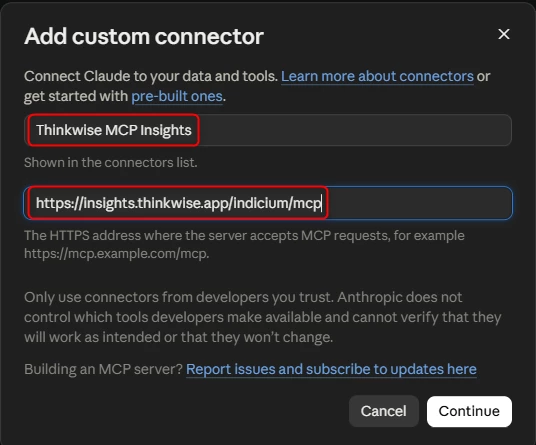
- Under the OAuth settings, select ‘Use your own OAuth client’ and enter insights_mcp as the client ID. Leave the client secret empty. If it requires a value, enter insights_mcp again.
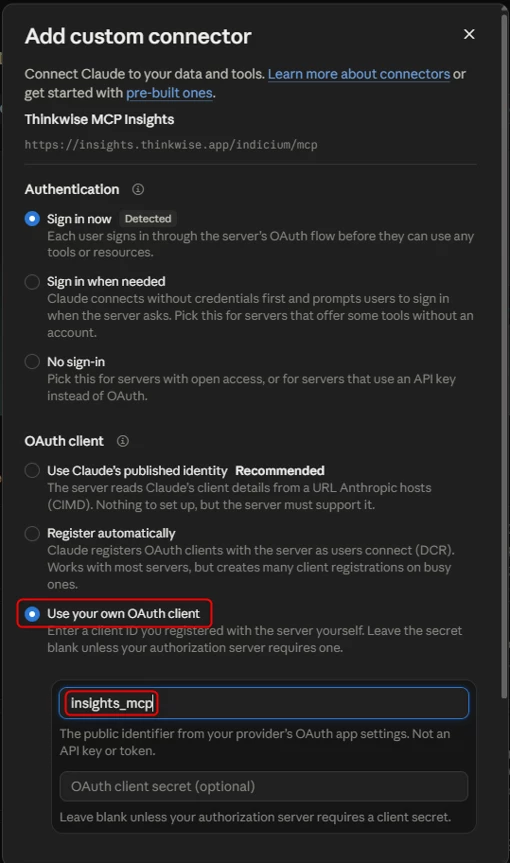
- Click Connect and sign in with your Community username and password.
No option to add a custom connector? Business accounts often restrict this. Ask your infrastructure team for permission, or have them add the connector for you.
Prompts to get you started
Not sure what to ask? Try one of these (or ask your AI assistant for inspiration):
Ask
- Which projects are currently running, and when are they planned to finish?
- Which unread emails have a high priority?
- Show me all high-priority tasks that are not completed yet.
- Which employees have a birthday this month?
Analyze
- Which active subprojects will run out of budgeted hours before their planned end date at the current pace?
- Compare hours booked per activity over the last year. Where does most of the time go?
- Which employees spread their time across the most projects?
- How long does it take on average for an invoice to go from concept to paid?
Visualize
- Build a small dashboard with the invoice pipeline: how many invoices and how much money sits in concept, approved, sent and paid.
- Put our customers on a map, sized by the number of hours we worked for them.
- Create a timeline of all active subprojects with their planned start and end dates, and highlight the ones running late.
- Show the hours booked per month over the last two years as a line chart. Are there seasonal patterns?
Act
- Book 3 hours of Analysis and 2 hours of Meeting on Chema centro comercial for yesterday.
- Complete the hour registration for this week.
- Mark all low-priority emails from this week as read.
Combine
- Find all hours that are booked but not invoiced yet, group them per customer, and generate the invoices for the three largest.
- Find the subproject that is furthest over budget, explain where the extra hours went, and draft an email to the project manager.
- Which employee spent the most time on projects that went over budget? Show it in a chart and suggest what we could learn from it.
Tip: start with a broad question and drill down from there. Your AI assistant remembers the context of the conversation, so a follow-up like "and why is that one over budget?" works fine.
From demo to your own application
Now picture this on your own application. Think of the questions that land in your inbox, or the ones your users never ask because the answer is spread across three screens. Try similar ones on the Insights demo and see how far you get.
Ready to try it on your own data? MCP is available from Thinkwise Platform 2026.3 and free to use in your Develop and Test environments. Here's how to set it up:
What is the first question your users would ask? Share it in the comments below. We're curious to see what you come up with.