



Every company that supports customers handles tickets, and every ticket opens the same way. Someone reads it, works out what it is about, checks that nothing is missing, and moves it along. That groundwork is important but repetitive, and repetitive work is the best kind to hand to a computer.
AI makes that possible in a way traditional tooling never could. A ticket is unstructured text, and unstructured text resists rules and algorithms. AI reads it comfortably. It turns free-form input into structured data, which opens the door to features that were never practical before.
In this blog we put that to work. The system we build detects the language a ticket was written in, translates it so your support staff can read it, writes a short summary so anyone can grasp it at a glance, and checks that the ticket is complete before a person ever picks it up. Each of those steps runs on its own, in the background, the moment a ticket arrives.
Translation is the part that stands out. Support no longer has to be limited to the languages your team speaks. A customer writes in their own language, your staff answers in theirs, and the translation happens in between without either side noticing. Everyone works in the language they prefer, and nobody waits on a bilingual colleague.
The demo is based on the TCP ticket AI demo from the Thinkwise Summit 2025. This version keeps the same idea, but generic, so you can use the ideas in your own model.
Before you start
Generative AI provider. The LLM steps call an external model, so you need a generative AI provider configured for your branch (OpenAI, Azure OpenAI, or any OpenAI-compatible endpoint). See the Generative AI docs.
Platform version. The LLM connectors arrived in 2023.3, so build on that version or later.
The ticket process
Lets walk through the entire process. We start where the customer does: by creating a new ticket. They open the ticket form, give it a title, and describe the problem in their own words. They attach anything that helps, a screenshot or a log, and click Create new ticket. That is the entire job from their side. Everything after that point happens on its own.
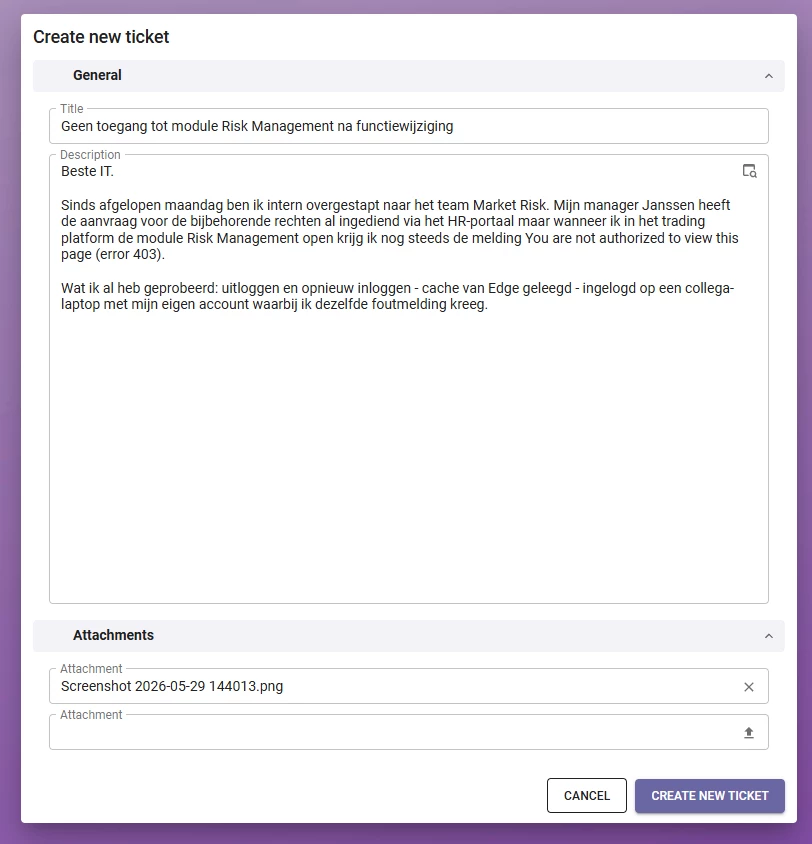
Notice what this customer included: the problem written in Dutch, an error code and the steps they already tried, and an attachment. That detail matters later, because the completeness check looks for exactly these things. From the moment they hit create, the system takes over:
- It determines the language the ticket was written in.
- It translates the ticket into the language support works in.
- It writes a short summary.
- It runs a completeness check: are reproduction steps described, and if an attachment is mentioned, is it actually there?
- If a check fails, it adds a comment asking the customer for the missing information.
- If the ticket passes, its status moves to In progress. Once translated, it becomes available to internal staff.
Each of these steps runs on its own, in the background, without making the customer wait. That background execution is the first thing to build.
Working asynchronously
Not every action should block the user. A quick action that finishes in a second or two is fine to run synchronously. The user can wait. Longer business logic is different. Several LLM calls in a row take real time, and you do not want to freeze the screen while they run.
So we run that work asynchronously. The logic executes in the background while the user keeps working. They can start a process, move on to something else, and come back when it is done. For a ticketing system this matters a lot. A customer should never sit and watch a spinner while three or four AI steps complete.
A reusable async queue
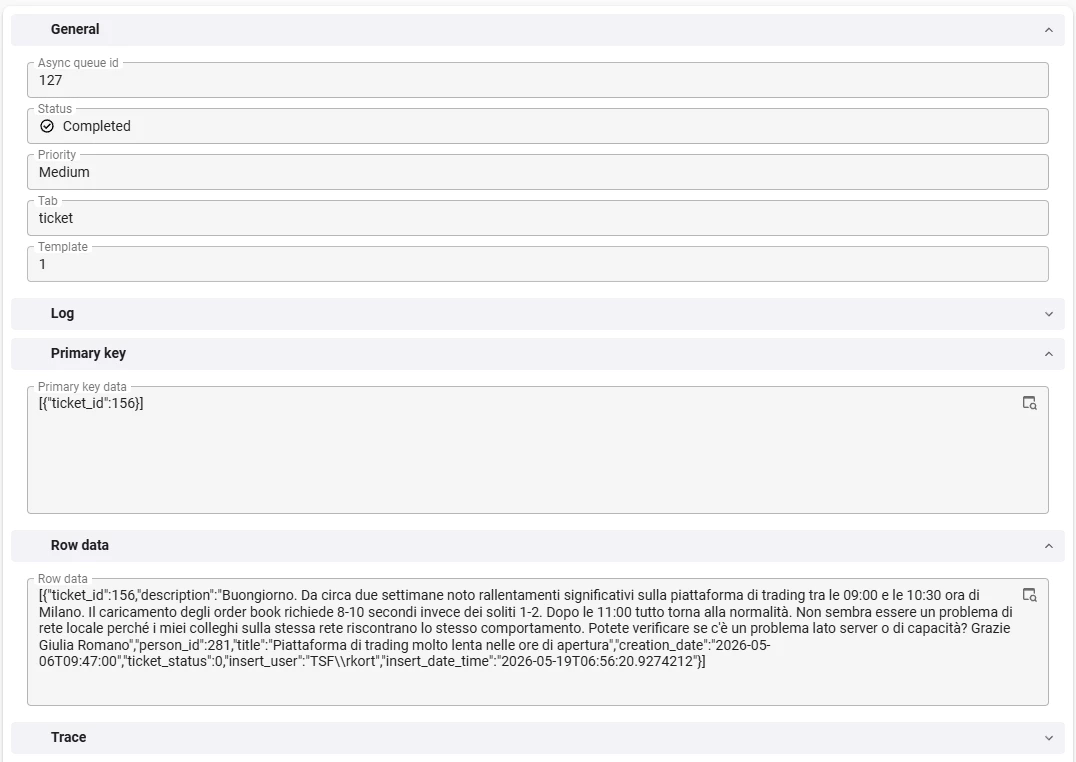
Before the architecture, here is the whole thing in one breath. A customer logs ticket 156 in Italian. That insert fires a trigger, and the platform builds a background job from a template. The job runs five steps in order: detect the language, translate the ticket, write a summary, check it is complete, and set the status. The customer never waits, and an agent picks up a tidy, English, ready-to-work ticket. Everything below explains how that job is built and run.
To run background work in a controlled way, we use an asynchronous queue. The queue is a central place to execute and track everything that runs in the background. It makes sure tasks run in the right order, with the right input, and with progress you can follow.
The point of a queue is reuse. Without it, you would build a separate process flow for every asynchronous action in your application. With it, you have one mechanism and one place to monitor every background task.
Everything here is built from standard Thinkwise process flows and subroutines, so if a concept below is new to you, those guides are a good place to go deeper.
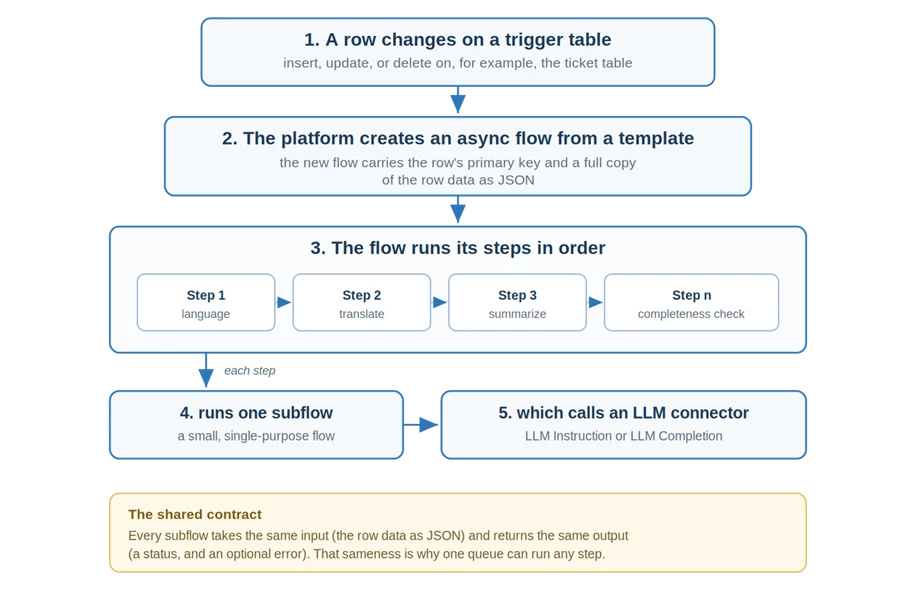
Key terms
Trigger table a table whose inserts, updates, or deletes can start a background job.
Template a reusable recipe: an ordered list of steps that defines what a job does.
Async flow a live job created from a template when a trigger fires. It carries the triggering row's data.
Async flow step one stage in a job. Steps run in order, and each one runs a single subflow.
Subflow a small, single-purpose process flow (detect language, translate, and so on). Every subflow shares the same input and output.
The simplest queue is a table of actions plus a system flow that runs them in order. We need more than that. Some steps must wait for an earlier step to finish first. So we use an async flow built from individual async flow steps. Each step runs one subflow, and a subflow can hold one or more actions.
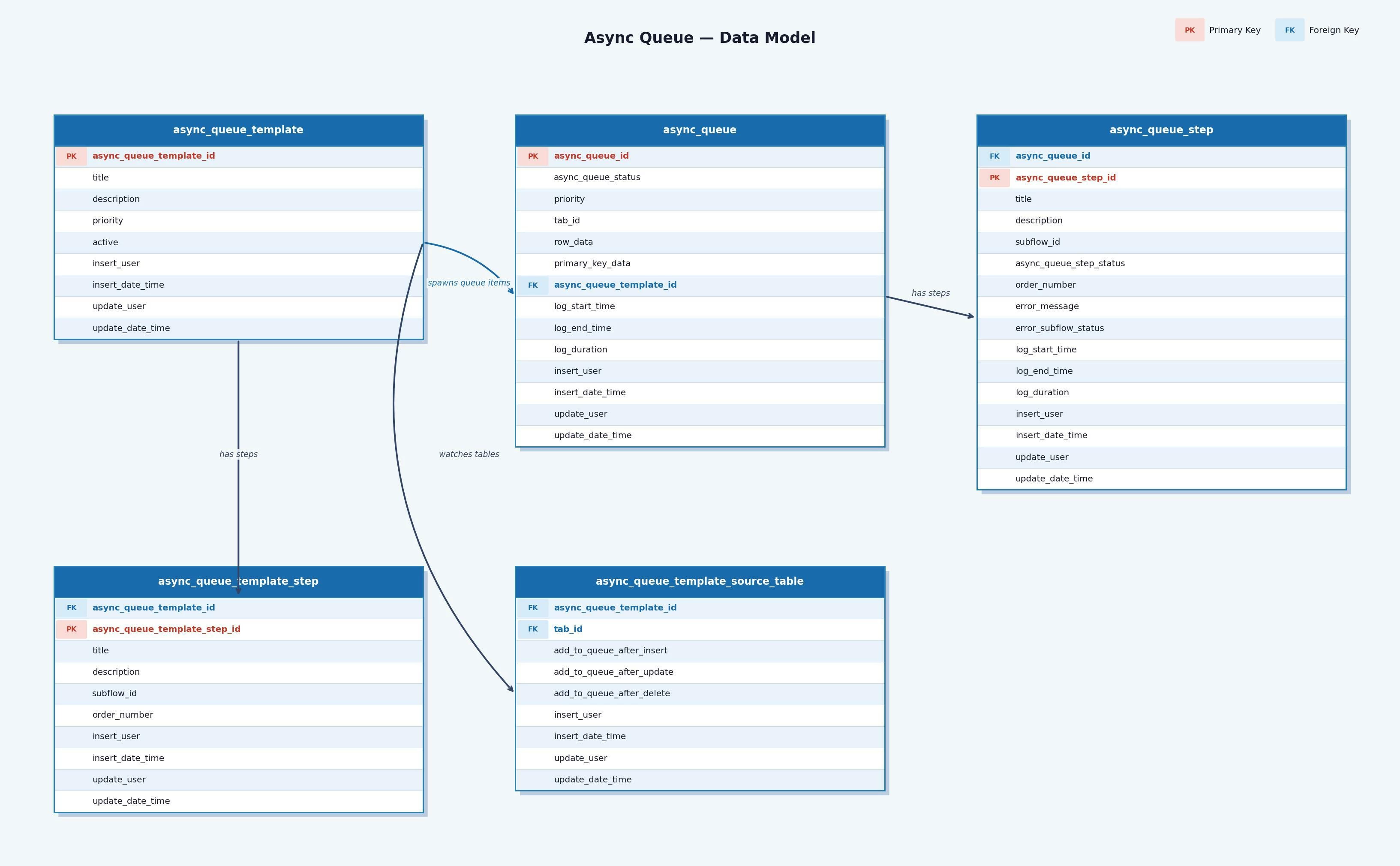
Async flow templates
We rarely want to run a single, isolated step. We want the same ordered sequence to run every time, for every ticket. Templates give us that. A template is a recipe: an ordered list of async flow steps, where each step points at the subflow it should run. You build the recipe once and reuse it forever.
A template on its own is just a definition. Nothing happens until a trigger creates a live async flow from it. At that point the platform copies the template into a concrete flow with its own steps, each carrying its own status, plus a slot holding the data of the row that set it off. From there the steps run in order, one after another, each picking up where the last left off.
Every step in a template receives the same input: the row data of the row that triggered the flow. That single rule is what makes the steps interchangeable, and it is worth dwelling on. So the next section looks at the subflows those steps actually run.
Subflows: the interchangeable building blocks
Each step in an async flow runs one subflow. A subflow is a small, self-contained process flow that does exactly one job: detect a language, translate a text, write a summary, run a check. Developers build them in the Software Factory, and each one stays focused on its single task.
What ties them together is a shared contract. Every subflow in the queue takes the exact same input and returns the exact same output. The input is a JSON variable holding the triggering row's data. The output is a status and, optionally, an error message. Because the contract is identical, the queue can run any subflow without knowing what it does. That uniformity is the whole trick. One process flow can run any step, in any template, because every step looks the same from the outside.
Making a new subflow usable in the queue takes one deliberate act: add the tag available_in_async_queue to it in the Software Factory. A piece of dynamic model then reads every subflow that carries the tag and wires it into the async_queue process flow for you. This happens during definition generation, when you generate or upgrade the application. So adding a capability is a short loop: build a subflow that honors the contract, tag it, regenerate, and it shows up as a step you can select in a template.
The payoff is that the queue stays open for extension. New behavior is opt-in through a tag, never surgery on a shared flow. You add a step without touching the central process flow, which keeps that flow generic and keeps the risk of breaking existing steps close to zero.
Deciding what sets a flow in motion
A template still needs something to start it, and that something is a change in your data. This is the same idea a service bus uses: the meaningful events in an application are mutations on tables. A new ticket is an insert on the ticket table. A status change is an update. By binding automation to those events, it reacts to real business activity, with no extra wiring in your screens or logic.
To make a table eligible as a trigger in the first place, add the tag available_in_async_queue to it in the Software Factory. The tag keeps the list of triggerable tables intentional, rather than exposing every table in the model. With that done, you register the table on a template and choose which mutations should fire it: after insert, after update, after delete, or any combination of the three. A ticket table, for example, might fire after both insert and update, so a brand new ticket and an edited one both run the flow, while a delete leaves it alone.
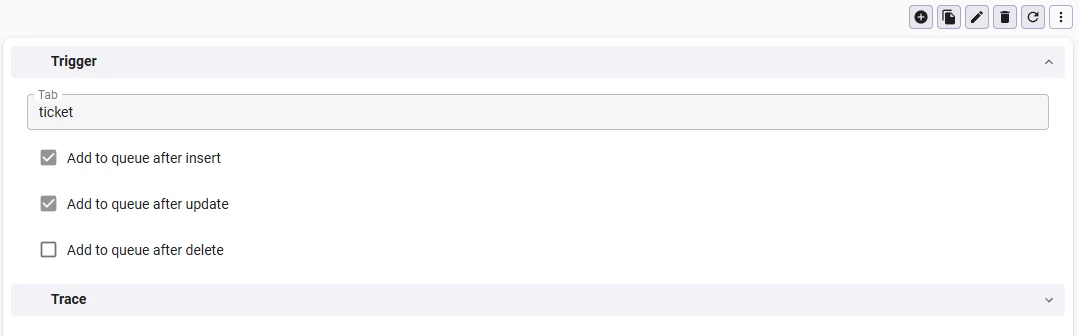
When a registered mutation happens, the platform creates a fresh async flow from the template and hands it everything it needs to act on the right record. That means two things travel with the new flow: the primary key of the mutated row, and a full copy of that row's data as JSON. The primary key tells every step exactly which record to write back to. The row data lets a step read the values it needs without a single extra query.
How the async queue runs
Here is the process flow that runs the queue.
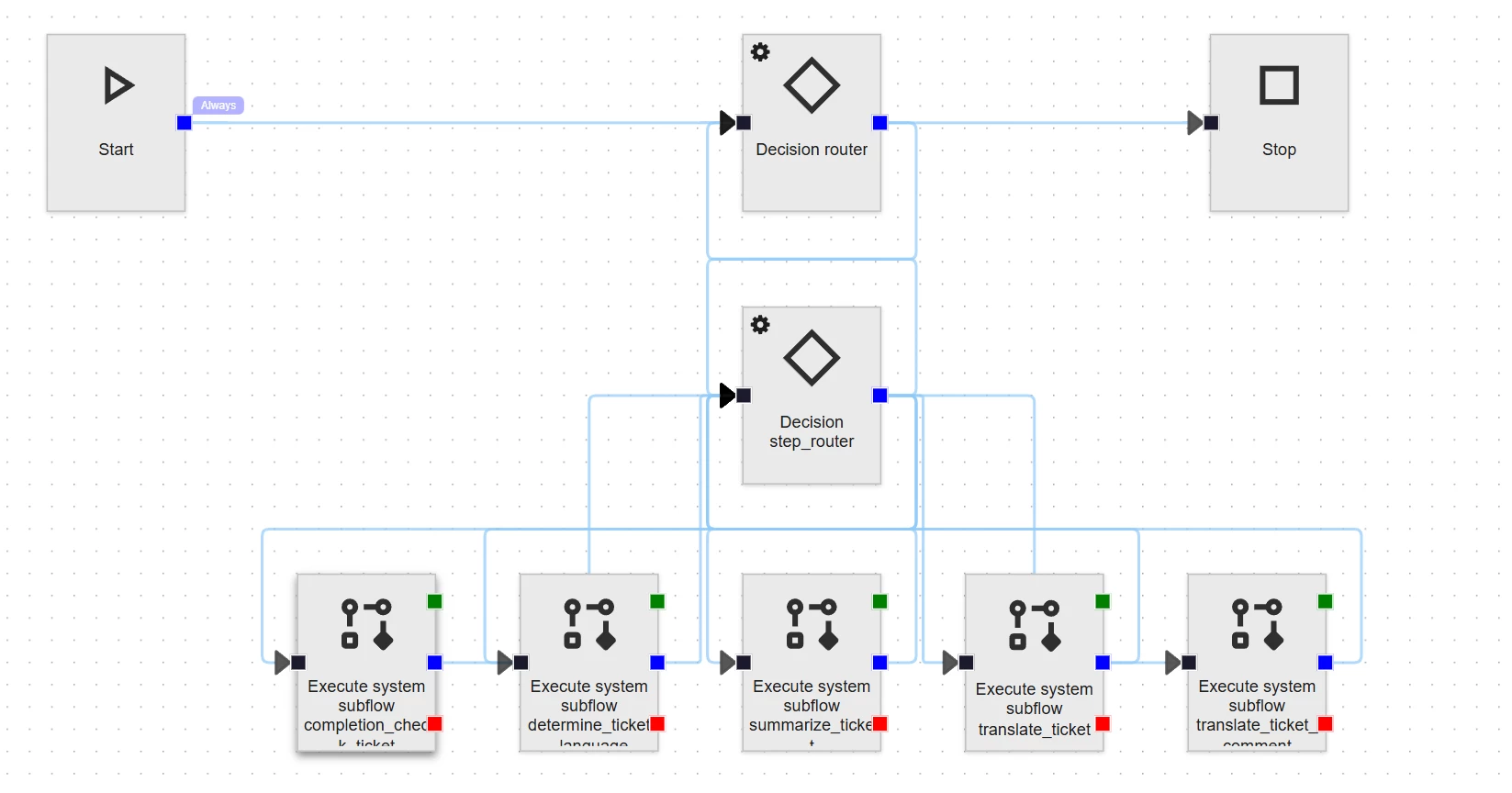
When the flow starts, it goes to the router decision node. The router checks whether there is an async_queue item waiting. If there is, it sets that item to In progress and loads its details into variables for the rest of the flow.
Next comes the step router. This decision node walks through the steps of the current item. It finds the next step to run, sets it to In progress, and fills the matching process variables. If there is a next step, the flow moves to the execute system subflow task. If no steps remain, it returns to the router to mark the item complete and look for more work.
Two routers, two jobs
The router works at the level of whole jobs. It picks the next async_queue item to run and, when one finishes, looks for the next.
The step router works inside one job. It walks through that job's steps in order, running each subflow until the steps run out.
Executing a subflow
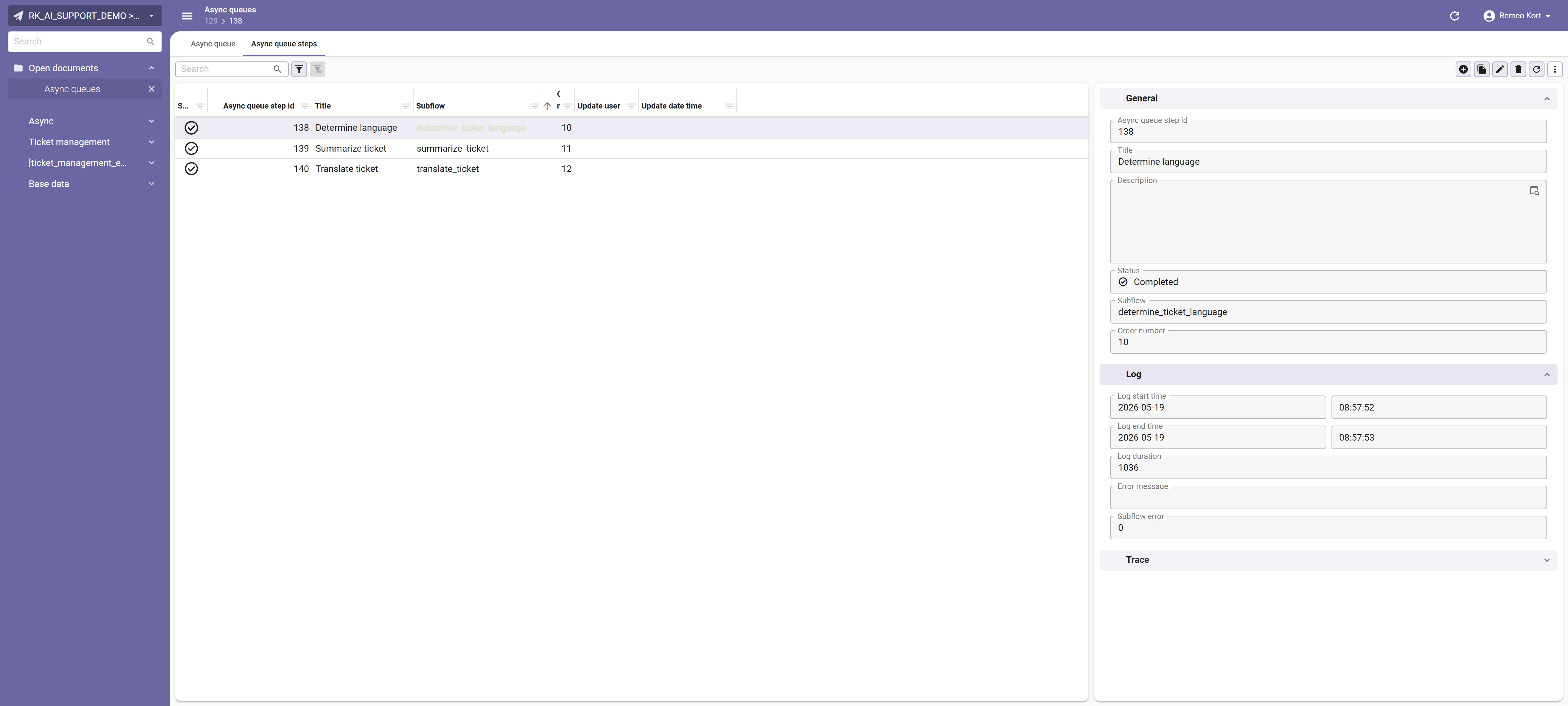
This is where the tagged subflows from earlier actually run. The step router hands the current step its input, the JSON variable with the triggering row's data, and runs the subflow behind it. The subflow returns its status and any error message, and both are stored on the async_queue_step. That leaves you a clean, per-step log to read back whenever you need to see what happened, in what order, and why something failed.
Deciding where to go next
After a subflow runs, the step router checks for more steps. If there are more, it runs the next one. If there are none, it hands control back to the router. The router marks the async_queue as complete, or as error if a subflow reported one. It then clears the queue variables and checks for other queues waiting to run. If it finds one, it loads its variables and returns to the step router. If not, the flow stops.
Loops, and how to keep them safe
The queue runs on a loop. That is what makes it powerful. One process flow handles as many items and steps as needed, so you never have to model every possible path. A loop also carries a risk. Action A goes to action B, B goes back to A, and the flow keeps running until the heat death of the universe.
The first habit that keeps a loop safe is a conservative exit. The decision that controls the loop should default to stop, and only continue when you are certain there is more work to do.
Tip: add a guard against infinite loops
On top of a conservative exit, add a hard limit. I keep a step counter process variable that increments every time the router runs. Past a set threshold, the next step is always stop. Even if a mistake puts the flow in an infinite loop, the counter ends it.
Putting it to work: the ticket pipeline
That is a fair amount of plumbing. Now the payoff. Let us apply all of it to the ticketing process.
In this chapter we are looking into each specific subflow that together built the our async flow. As mentioned before each subflow is a single step in our process. For each step I cover two things: what it does for the business, and how it works in the platform.
Determining the ticket language
What it does. Almost everything downstream depends on knowing which language a ticket arrived in. The translation step needs a source language to work from, and a stored language code is useful later for routing, reporting, or filtering. So we ask an LLM to read the ticket description and return the language as a two-letter ISO code. A short, standard code like en or nl drops neatly into a single column and is trivial to compare against.
How it works. We build a dedicated subflow for this one job. In the prepare_data decision node we pull the ticket description out of the JSON input the queue passes in. An LLM Instruction process action then inspects that text, with an instruction that asks for the language as a two-letter ISO code and nothing else. Keeping the instruction that tight matters. It stops the model from replying in a full sentence that we would then have to clean up. On success the action returns the code, and parse_data writes it back to the ticket. The subflow closes by reporting its status, exactly as the contract requires.

The prompt itself is short and strict. It feeds the ticket_description in as the text and tells the model to return only the two-letter ISO code:
“Determine the language the provided text was written in and provide it as its two letter language ISO code. Do not explain anything return just the iso code”
Result. the ticket now stores a two-letter language code, ready for the translation step to use.
Translating a ticket
What it does. This is the step that lets a customer and an agent work in different languages without either of them noticing. We translate the ticket into the language our support staff uses, English, and we translate both the title and the description so the whole ticket reads naturally. The original text stays untouched on the ticket. The customer always sees their own words, and we keep a faithful record of what they actually wrote.
How it works. We start with a subflow that follows the standard contract. Its shape is simple: prepare the data, run the translations, then store the results.

On top of the standard input and output, the subflow holds a few variables of its own for the values it moves around: ticket_id, title, title_translated, description, and description_translated. In prepare_data we read the ticket_id, title, and description into them. We then run two separate LLM Instruction process actions, one for the title and one for the description. Keeping them apart means each translation maps cleanly back to its own column, and a long description never crowds out a short title. Both instructions translate into English and, just as important, tell the model to leave any HTML formatting in place, so bold text, line breaks, and lists survive the round trip. In parse_data we write both translations back to the ticket, ready for support to read.
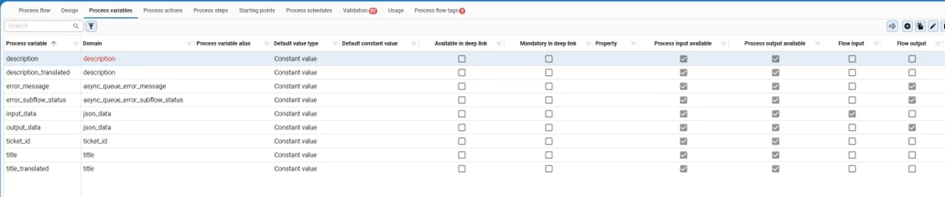
Each instruction is deliberately plain: take the text, translate it into English, and leave the HTML and formatting untouched. Here is the one used for the title:

Result. an English title and description sit alongside the originals, so support reads English while the customer keeps their own words.
Summarizing a ticket
What it does. A long ticket is slow to triage. A two-line summary lets an agent grasp the gist before opening anything, and it scales: a queue of summaries is far quicker to scan than a queue of full descriptions. The summary is reusable, too. It feeds neatly into BI reporting, dashboards, or AI overviews that want a compact version of each ticket rather than the whole text.
How it works. The pattern is the one you have seen twice now. In prepare_data we pull the description into a process variable. An LLM Instruction process action turns it into a short summary, guided by an instruction that asks for a brief, factual recap. We parse the result and store it on the ticket. This summary is always written in English, because only internal staff ever see it, which also keeps it consistent across every ticket regardless of the original language.

The instruction asks for a single English paragraph, focused on the key points, and never longer than the original text. That last constraint keeps the model from padding a short ticket into a long one:

Result. a short English summary stored on the ticket, ready for quick triage and for reuse in BI or AI overviews.
Completeness check
What it does. This is the first quality gate, and it is what keeps half-finished tickets off your agents' desks. We check whether a ticket has what someone actually needs to start work on it. Two things in particular: does it describe reproduction steps, and if the customer mentions an attachment, is that attachment really there? When both pass, the ticket moves to In progress on its own. When one fails, the system posts a comment asking the customer for the missing piece. The ticket keeps moving without a person having to read it first, and the customer gets a fast, specific reply instead of silence.
How it works. We prepare the data by pulling the description into a process variable, then run an LLM Completion process action. We use a completion call here rather than an instruction because we are not transforming the text. We are asking the model for a verdict and reading back a structured answer we can act on. The prompt does the work:

This is the prompt we are using:
You are a reviewer of support tickets. Your goal is to judge whether the text
adheres to the guidelines. When it does adhere to the provided guidelines return 1,
when it does not adhere to the guideline return 0.

The output should be a valid JSON formatted array with every guideline and whether
the ticket adheres to it. Use the guideline number as the key for the array. Do not
explain anything, return just a JSON array. Be really critical, do not try to please.
If you are unsure whether the ticket adheres to a guideline return 1.

The JSON should be structured as follows:
{
    "1": 0,
    "2": 1
}

Check for the following guidelines:
1. Does the ticket description mention reproduction steps?
2. Does the ticket description mention or refer to an attachment?

Validate the following text:
{ticket_description}
We name the exact guidelines to check against. We give a concrete example of the output structure. We ask for JSON and nothing else, and we tell the model to be critical rather than agreeable. LLMs tend to please and explain. Here we want neither.
In parse_data we act on the result. If the first check fails, meaning no reproduction steps, we add a comment asking the customer to add them. Without reproduction steps, an employee often cannot find the cause of a problem.
The second check needs one more move. The prompt only tells us whether the text mentions an attachment. Whether an attachment exists is something we verify ourselves. So we run an if-exists check against the ticket's attachments. If one is there, we continue. If not, we add a comment asking the customer to provide it.
When both checks pass, the ticket status moves to In progress.
Result. a complete ticket moves to In progress on its own, while an incomplete one gets a specific comment asking the customer for exactly what is missing.
The result, all together
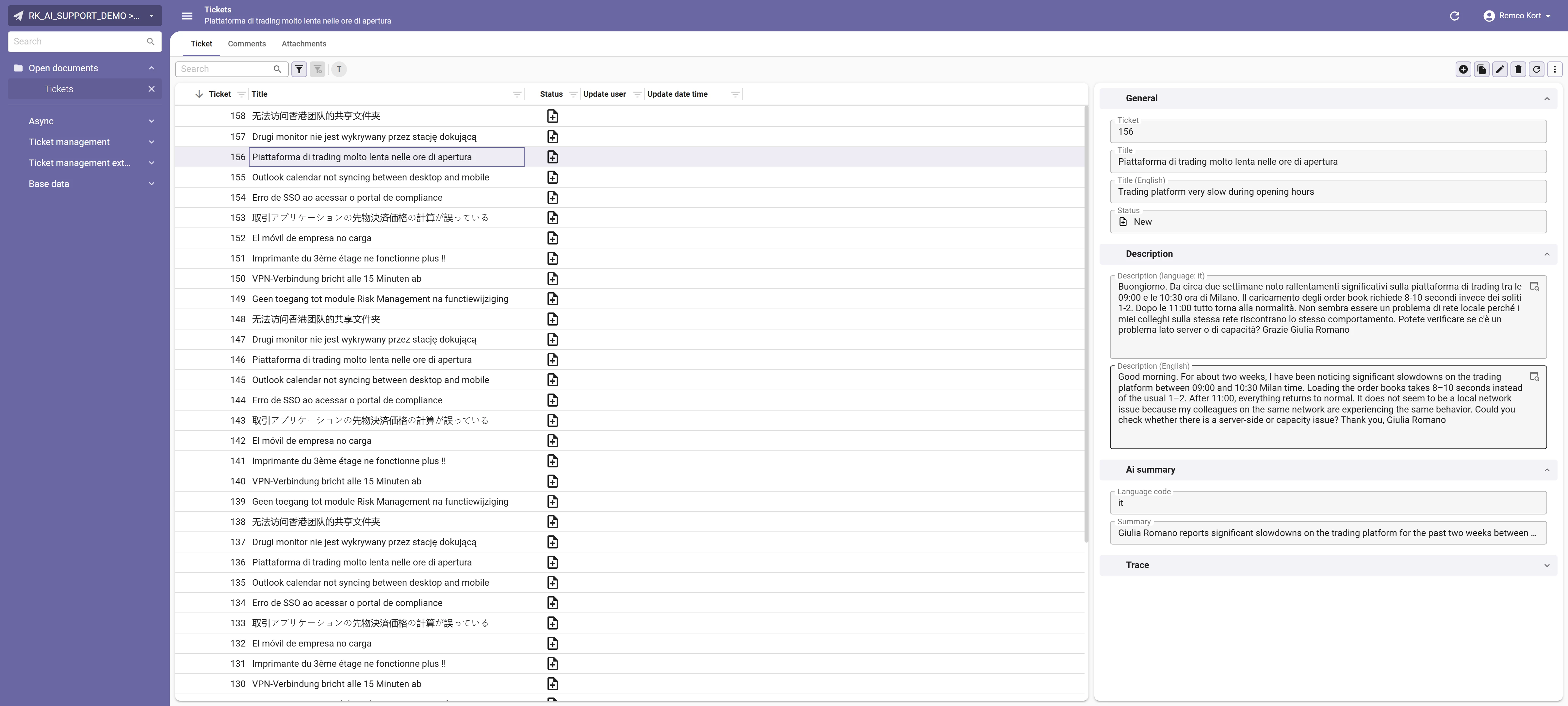
Run all four steps and the queue turns a raw ticket into something support can act on. Look back at ticket 156, the Italian trading-platform ticket from the start of this blog. The customer's original Italian sits untouched, with an English translation beside it, a language code of it, and a one-line summary ready for triage. The ticket list shows the wider effect: tickets arrive in Dutch, Polish, Japanese, Chinese, French, and more, and every one becomes workable for an English-speaking team without anyone translating by hand.
This is just the beginning
This is a thorough deep dive into building an AI-powered ticketing system, and it is only a starting point. The example is deliberately generic. Think about what makes your tickets different from everyone else's. Those differences are where the best additions live. I hope this example can serve as inspiration on how to implement AI in to your application!