Closed

Show the applied objects per Translation object

Related products:Software Factory
  • February 28, 2020
  • 5 replies
  • 68 views

Forum|alt.badge.img+17

To Make the translations screen easier to use please add either a badge with the number of objects for a specific translation or add a reference showing the objects. Now If i want to rename a column i first have to check if the column is used more than once. If the translations screen would show me the translation object is used only once i can safely change the translation. 

5 replies

Harm Horstman
Superhero
Forum|alt.badge.img+21

I like it, or even better, show all related objects in a detail tab


Mark Jongeling
Administrator
Forum|alt.badge.img+23

Hi Erwin,

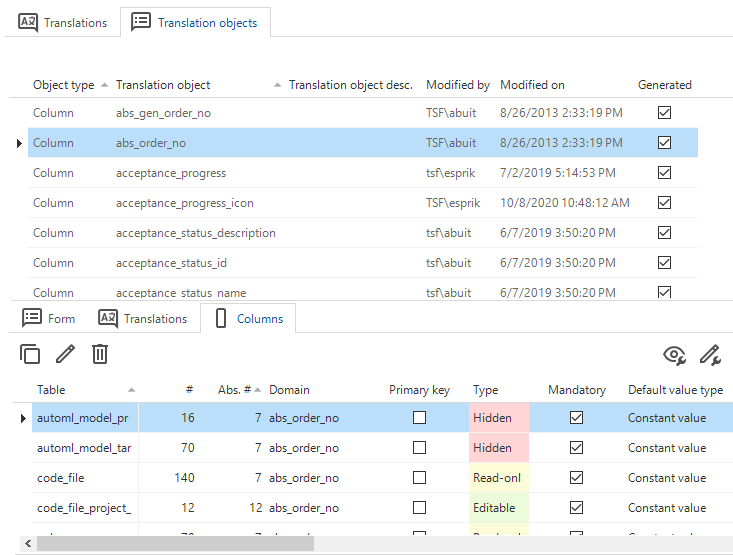
Does this screen give you the information you are looking for?:

(Software Factory > Translations > Translation objects > Columns)

Software Factory > Translations > Translation objects > Columns


Mark Jongeling
Administrator
Forum|alt.badge.img+23
Updated idea status OpenNeeds feedback

Forum|alt.badge.img+17
  • Author
  • Moderator
  • May 10, 2021

Hi Mark,

This is really helpful! Thanks.

Erwin


Mark Jongeling
Administrator
Forum|alt.badge.img+23
Updated idea status Needs feedbackClosed