Working on it!

Select all records including other pages (Universal)

Related products:Universal UIIndicium Service Tier
  • February 9, 2024
  • 14 replies
  • 272 views

In the Web GUI it was possible to use “Select all” and when activating a task it would ask if you wanted the records on the page or all records of all pages.
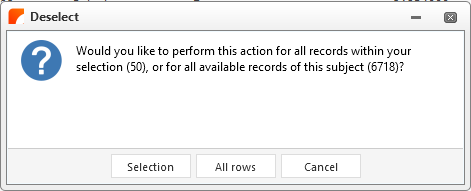


Please add this also in the Universal and in addition make it work with the Multi Select XML parameter, as this popup did not seem to happen in that case.


14 replies

Mark Jongeling
Administrator
Forum|alt.badge.img+23
NewOpen

Arie V
Community Manager
Forum|alt.badge.img+12
  • Community Manager
  • November 4, 2024
OpenWorking on it!

Arie V
Community Manager
Forum|alt.badge.img+12
  • Community Manager
  • November 4, 2024

Indicium team is currently working on new API's, after which the Universal GUI can implement this feature.


Forum|alt.badge.img+2

Is there any update on this? 


Arie V
Community Manager
Forum|alt.badge.img+12
  • Community Manager
  • November 18, 2025

@martijngaasbeek Yes, we hope to release this feature specifically for Tasks/Reports with Indicium + Universal 2025.3.13, so in 4 weeks!

We’ll continue work on supporting multi-select Delete in a similar fashion in a later release.


Arie V
Community Manager
Forum|alt.badge.img+12
  • Community Manager
  • December 17, 2025

With Indicium + Universal UI 2025.3.13, Task and Reports can now be run over all records on all pages using Ctrl + A.


Forum|alt.badge.img+2

Awesome!

However I get an error on an task when I run it for all rows: 

System.InvalidCastException: Failed to convert parameter value from a DateTimeOffset to a DateTime. ---> System.InvalidCastException: Object must implement IConvertible.

When I'm running it for 100 rows, it is working.
But when I select all rows, I get this error for the same task. 


Arie V
Community Manager
Forum|alt.badge.img+12
  • Community Manager
  • December 23, 2025

@martijngaasbeek could this be due to some specific record for which the stored DateTime is in fact a DateTimeOffset?
https://learn.microsoft.com/en-us/answers/questions/307663/failed-to-convert-parameter-value-from-a-datetimeo


If you don’t see something odd in your data or data model, please raise a ticket for Indicium and include a Model export as well as information which Task fails on which Subject.


Arie V
Community Manager
Forum|alt.badge.img+12
  • Community Manager
  • January 13, 2026

Awesome!

However I get an error on an task when I run it for all rows: 

System.InvalidCastException: Failed to convert parameter value from a DateTimeOffset to a DateTime. ---> System.InvalidCastException: Object must implement IConvertible.

When I'm running it for 100 rows, it is working.
But when I select all rows, I get this error for the same task. 


Update: this proved to be a bug that could occur on Subjects with an image column. This will be resolved in the Final build of Universal 2025.3.14 (bug still exists in the currently available Release candidate).


Forum|alt.badge.img

Awesome!

However I get an error on an task when I run it for all rows: 

System.InvalidCastException: Failed to convert parameter value from a DateTimeOffset to a DateTime. ---> System.InvalidCastException: Object must implement IConvertible.

When I'm running it for 100 rows, it is working.
But when I select all rows, I get this error for the same task. 


Update: this proved to be a bug that could occur on Subjects with an image column. This will be resolved in the Final build of Universal 2025.3.14 (bug still exists in the currently available Release candidate).


@Arie V should this bug be fixed in Universal version 2025.3.14.0 and Indicium version 13.1? Or is the 'final build’ not available yet? 


Arie V
Community Manager
Forum|alt.badge.img+12
  • Community Manager
  • April 13, 2026

@Benji van Kleef This has indeed been fixed in the Universal UI version 2025.3.14. But by now we are on version 2026.1.13, and I'd strongly recommend you work with the latest version. The latest Indicium and Universal UI always work with all supported Platform versions like 2025.3.


Forum|alt.badge.img

@Benji van Kleef This has indeed been fixed in the Universal UI version 2025.3.14. But by now we are on version 2026.1.13, and I'd strongly recommend you work with the latest version. The latest Indicium and Universal UI always work with all supported Platform versions like 2025.3.

Thank you for your reply. We are on 2025.3.14 but we get the same errors in the Universal. Ill make a TCP ticket for this. 
Sadly we can't go to 2026.1.13 yet as we still work with the Windows GUI. We are preparing the transfer to the Univeral GUI but we need to have this issue resolved first.


Arie V
Community Manager
Forum|alt.badge.img+12
  • Community Manager
  • April 14, 2026

@Benji van Kleef What I’m trying to say is that you can have SF & IAM on 2025.3, while using the latest Indicium & Universal UI (now 2026.1.13). With that setup you can use the Windows GUI in parallel.

On this specific Date error: we did have another edge case that had to be resolved and was resolved with Indicium 2026.1.11. You might be encountering that one too.

Before creating a TCP ticket, please first test with the latest Indicium & Universal UI combination.


Forum|alt.badge.img

@Arie V Thank you! The bug seems to be resolved with Indicium 2026.1.13 for us.