


Open

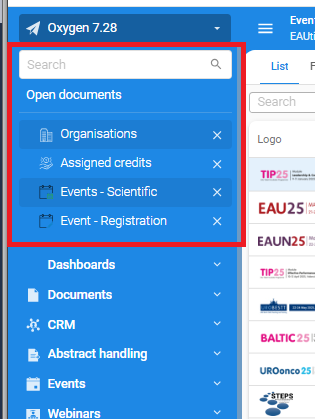
Search and open documents always visible on top of menu

Related products:Universal GUIUI/UX
  • April 24, 2025
  • 5 replies
  • 112 views

Forum|alt.badge.img+5

Can the search and open document always be visible on top, also when you are scrolling down.

In Windows GUI, the search is at least always visible, in Universal GUI all disappears when scrolling down in the menu



5 replies

Jeroen van den Belt
Administrator
Forum|alt.badge.img+10
NewOpen

Jeroen van den Belt
Administrator
Forum|alt.badge.img+10

Open the idea for voting. Perhaps you are also interested in this related idea: 


Jeroen van den Belt
Administrator
Forum|alt.badge.img+10
The following idea has been merged into this idea:

All the votes have been transferred into this idea.

Bart Metselaar
Moderator
Forum|alt.badge.img+3

Curious question: Could you ellaborate why you want the Open Documents stick to the top? We have to take into account that with a growing list of Open Documents, the amount of room to show the default menu items would decreases fast. 

We’ve recently added the possibility to collapse/expand the Open Documents section (if the user has opened menu items). Would that offer a solution to your use case?


Forum|alt.badge.img+5
  • Author
  • Vanguard
  • March 2, 2026

The option to collapse in combination to stick the open documents on top, would be the best solution. Then you can scroll through the (large) menu, but also open the open documents again and navigate back to your open work.