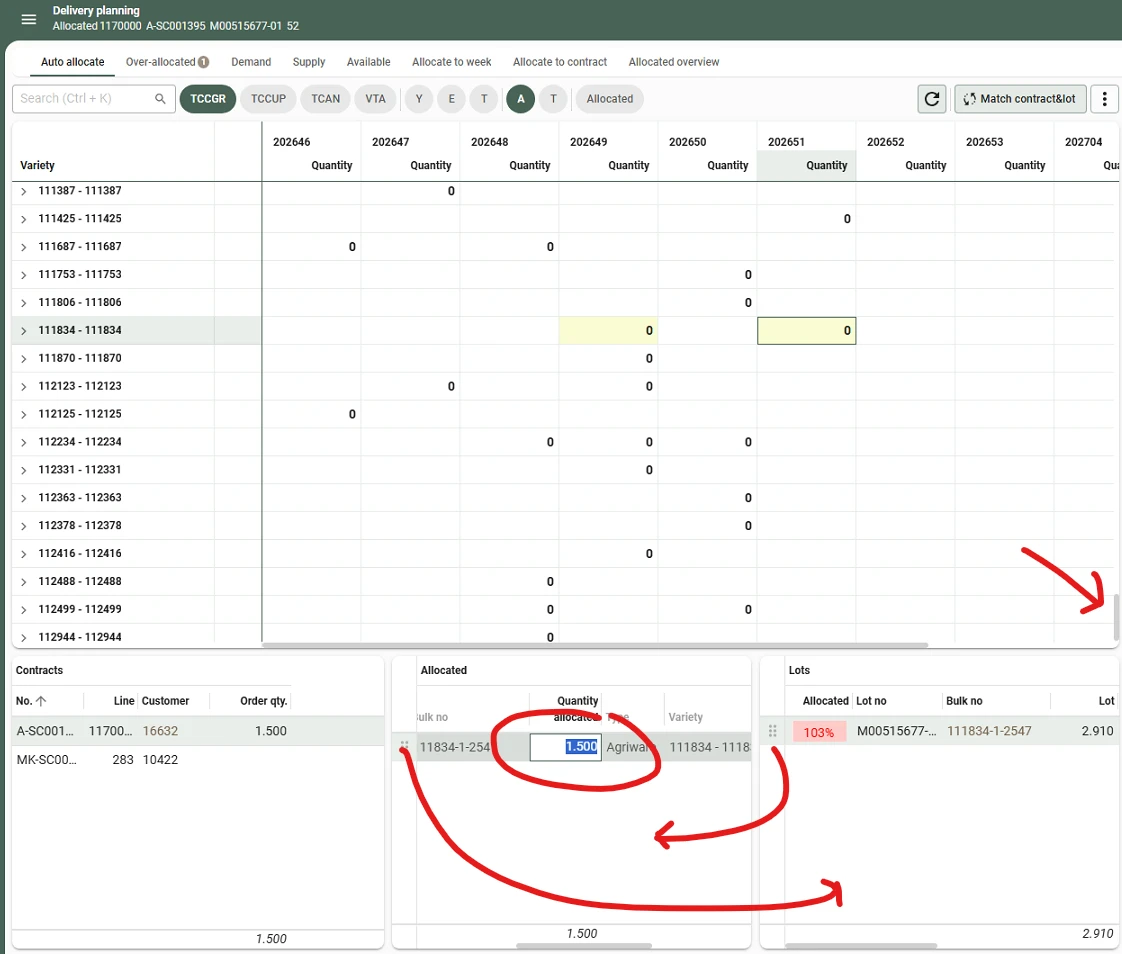




Current situation We have a screen with a Cube (master) and multiple detail tabs. The cube itself is read-only, while the underlying data is modified via the detail tabs (using Edit in grid or Drag & Drop between details).
Whenever a change is made in one of the detail tabs, the parent cube automatically refreshes to reflect the updated aggregates. During this refresh:
-
The cube's scrollbar jumps back to the top.
-
The visual highlight of the previously selected cell is lost.
Interestingly, the detail tabs retain their filtered data, which indicates that the cube still knows which cell/context holds the focus in the background—it is simply not reflected visually in the UI anymore.
Proposed solution When a Cube refreshes due to changes in a detail subject (or a general refresh where the selected coordinates still exist):
-
Automatically scroll the cube back to the position of the active/focused cell so the row/column is back in view.
-
Visually re-apply the cell selection highlight to the active cell.
Business value / Impact When users are actively planning or adjusting records in detail tabs based on cube totals, losing the visual anchor in the cube forces them to manually scroll and search for the cell they were just working on after every single edit. Retaining the visual focus and scroll position will significantly improve usability and speed up data-entry workflows.