Completed

Opening a Tile item directly as Pop-up screen

Related products:Software FactoryWindows GUI
  • February 20, 2019
  • 4 replies
  • 242 views

Mark Jongeling
Administrator
Forum|alt.badge.img+23
I would like to be able to open a tile item as a pop-up screen with a single click. For now, I have to click it, drag it out of the tab bar to a desirable place and then press full-screen.

For context:
The tile menu has a tile item which opens the Search Engine. With this engine, the user is able to search up products and more. Then by using drag-and-drop, the user can drag the product to his shopping cart to add it.

In this example it is always desirable that the search engine has been opened as a pop-up screen so the user can drag product from one place to the other.

  1. As a developer, I would like to be able to configure this in the Software Factory.
  2. As an user, I would like to be able to open any tile item as pop-up screen by right-clicking the tile item and then selecting 'Open as pop-up'.

Edit: It's possible to open a tile item as pop-up screen by holding the ALT key while clicking the item. However, this is not common knowledge among users.

Edit 2: Maybe Floating screen is a better name to use

4 replies

K.Bakkenes
Captain
Forum|alt.badge.img+9
  • Captain
  • February 20, 2019
Hi Mark,

it's already possible to open a tile item as a pop-up via 'Alt + Left-Click'. As far as I know this works for tile menu items, detail tiles and treeview menu items.

Mark Jongeling
Administrator
Forum|alt.badge.img+23
  • Author
  • Software Architect
  • February 20, 2019
Hi Mark,

it's already possible to open a tile item as a pop-up via 'Alt + Left-Click'. As far as I know this works for tile menu items, detail tiles and treeview menu items.

Hey Kevin,

Thanks for your reply and tip!. I edited my original post and added it in.

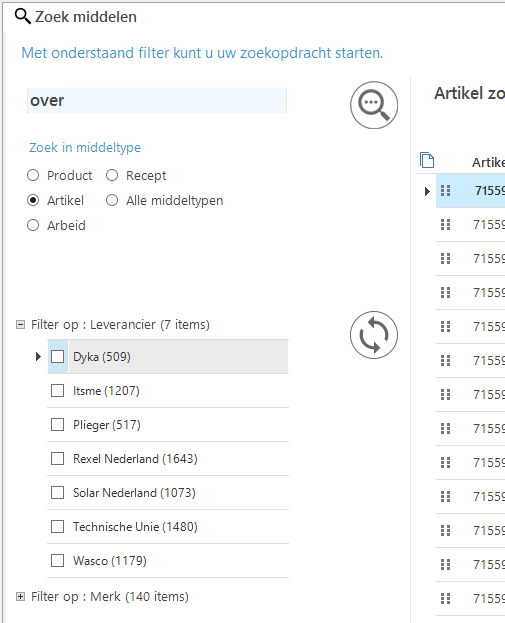
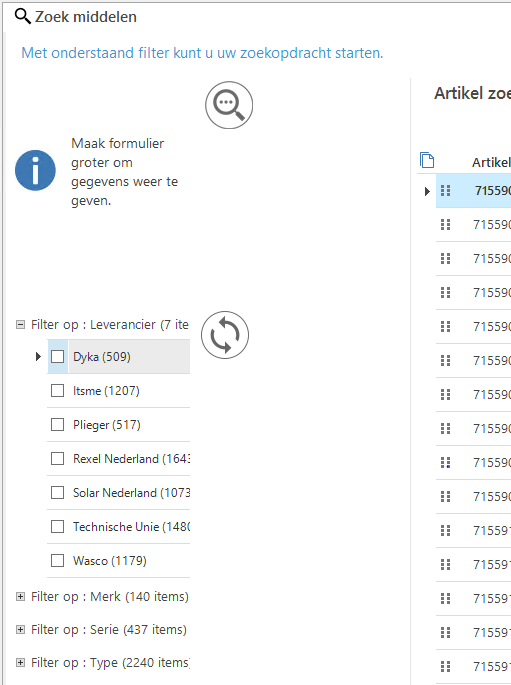
It does look like opening the search engine this way does not function properly with fixed on resize components:

Without using the Alt+click but opening it normally and dragging it out then click full screen:


When using the Alt+click:


I would like this to work properly too.

Anne Buit
Community Manager
Forum|alt.badge.img+5
  • Community Manager
  • February 21, 2019
Hi Mark,

Can you create a ticket in the Thinkwise Community Portal for the fixed-on-resize component when opening with Alt-Click? This looks like a bug.

Anne Buit
Community Manager
Forum|alt.badge.img+5
  • Community Manager
  • September 20, 2019
With Software Factory 2019.2, releasing in about a week, this is now possible.

You can create a process flow triggering on the open-document of said menu item and configure the document to open as floating in the process action settings.