


Open

Lookup control option for grid filter

Related products:Universal UI
  • May 7, 2026
  • 4 replies
  • 28 views

Ionut
Warrior
Forum|alt.badge.img+2

Hello!

I created this idea as result of this post: 

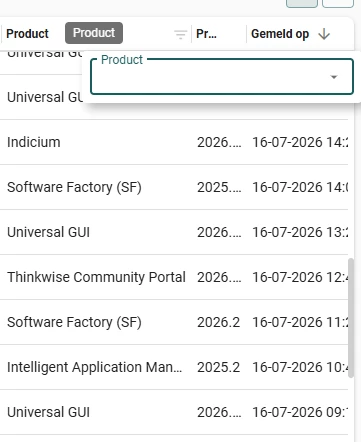
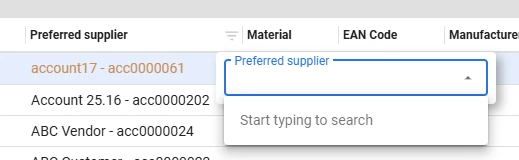
Basically, what we suggest is that there should be an option to specify the lookup control for grid filters, we received feedback from users about this and since that can be changed for form/tasks, will be nice to have it also in here.

Regarding performance mentioned in the post, one solution can be to have the sort defined and then pick top 100 for example and if you don't have what you want there to still be able to type and search it.



4 replies

Arie V
Community Manager
Forum|alt.badge.img+12
  • Community Manager
  • July 24, 2026

@Ionut A list of values is shown whenever there are less than 25 unique records in the data set. There is an Extended Property available to increase the threshold of 25 to a higher value, effectively increasing the chances that users get a list of items with checkboxes instead of the search field: Release notes Universal GUI 2025.3.12 | Thinkwise Community.

We don’t intend to support the Lookup control type setting for Grid filters anytime soon. I hope this will suffice for your needs?


Arie V
Community Manager
Forum|alt.badge.img+12
  • Community Manager
  • July 24, 2026
Updated idea statusNewOpen

Robin Liu
Sidekick
Forum|alt.badge.img+4
  • Sidekick
  • August 21, 2026

Our users also had the feedback that they would like a drop down list. There are data types when they would like to scroll through options, or even have it grouped like in Windows. Examples are looking at booked hours. There are a hundred types of work activities for booked hours. No one knows all codes and it is not like you can peak in the pop up when filtering.

I have noticed that users also sometimes use it as a way to view quickly which unique values exist in a table (when the table is a detail of another table or when other filters are applied). Much more convenient to click the filter on a column than it would be to open sort and then group by.

It might be nice to have a search bar at the top and underneath it the list of options, which can take a little longer to load. So, a combination of the search bar and list (extended beyond 25 elements).


Arie V
Community Manager
Forum|alt.badge.img+12
  • Community Manager
  • August 21, 2026

@Robin Liu We do intend to add support for opening the Lookup pop-up from within the Filter pop-up for Lookup columns. This worked in the Windows GUI, but not yet in the Universal UI. That might help the users who are looking for a hundred types of work activities.

If they want to have a quick way to see which unique values are available, you could increase the 25 limit as mentioned.

We like your suggestion of having both a Search bar at the top and underneath the list of options, and we'll look at implementing that for Domain with Element and Lookup controls.