




Open

HTML Tooltips in Treeview

Related products:Universal UI
  • August 18, 2026
  • 3 replies
  • 38 views

Harm Horstman
Superhero
Forum|alt.badge.img+21

I would like to request the addition of several core capabilities that are currently missing in the Tree View component:

  • Drag & Drop 
  • Add Expand All and Collapse All to (Custom-) Actionbar
  • HTML Tooltip
  • Lazy loading of child nodes to improve performance when working with large hierarchies
3 replies

Harm Horstman
Superhero
Forum|alt.badge.img+21
  • Author
  • Superhero
  • August 19, 2026

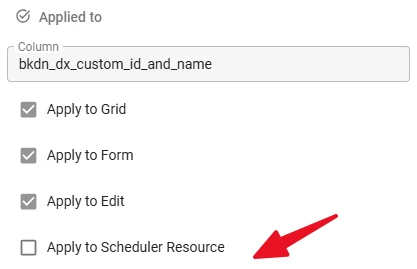
Also missing, the option to in-/exclude the Tree in Conditional Layouts


Arie V
Community Manager
Forum|alt.badge.img+12
  • Community Manager
  • August 21, 2026

@Harm Horstman Some things you're asking are actually already supposed to work or are planned already:

  • Drag & Drop should work, if not please raise a ticket. Check this topic for some setup support if needed: Drag and drop direction | Thinkwise Community
  • Expand/Collapse all buttons should automatically come available (if they are enabled) whenever a grouped component is used, this works for Tree / Grid / Pivot grid and Scheduler alike. Note that by default these buttons are configured to show in the Overflow menu. It could work fine to have those shown on the Action bar by default, as they only show if relevant. You can configure that on the Default or Custom action bars.
  • Smarter pagination and loading is something we plan to tackle for all kind of grouped Components. This is in the works for the coming half year.

HTML Tooltip and a separate ‘Apply to Tree’ setting sound like good, but 2 different Ideas. I'll rewrite this one to focus on HTML Tooltip, can you create a separate one for the ‘Apply to Tree’ setting? 


Arie V
Community Manager
Forum|alt.badge.img+12
  • Community Manager
  • August 21, 2026
Updated idea statusNewOpen


