
Completed

Extend Excel-style filtering by search field

Related products:Windows GUIUniversal GUI
  • August 29, 2019
  • 8 replies
  • 195 views

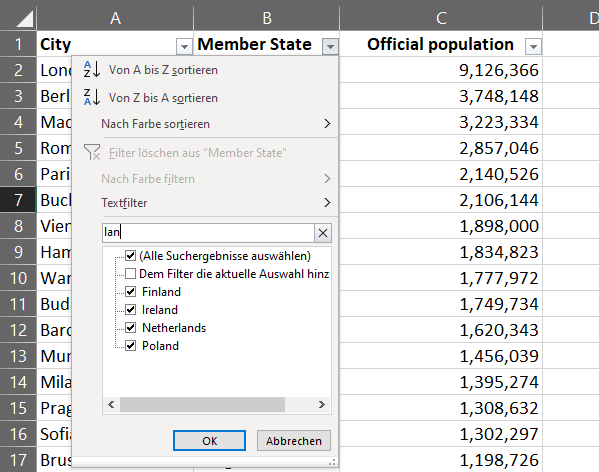
For filtering in specific columns Thinkwise has a great solution: you can easy filter in columns by clicking on the head of the column. This is Excel-style filter is quite similar to Excel. Within Excel there is an additional functionality which I like a lot and which I think would also be nice as functionality in Thinkwise: you can type into a search-field in the same small pop-up to filter the column. By that it is also possible to filter on a string which is not in front of the records in the column. What do you think about it, would that function be useful?


8 replies

Jop ter Horst
Vanguard
Forum|alt.badge.img+5
Hi Hauke,

If I'm not mistaken, this was briefly available in the GUI's, but reverted because of a bug in the third party component. Maybe @Anne Buit can shine his light on this?

Henk Nicolai
Moderator
Forum|alt.badge.img+2
  • Moderator
  • September 2, 2019
Hi Hauke,

I can safely say that no such feature has been available yet. That third party component Jop refers to exposes a similar feature but it doesn't look like the screenshot shown above.

However, an extra 'contains' field which is not hidden in a filter dialog but instead available directly in the column filter menu is definitely worth further research.

Jeroen van den Belt
Administrator
Forum|alt.badge.img+10
Updated idea status OpenOn the backlog

Erik Brink
Moderator
Forum|alt.badge.img+5
  • Moderator
  • April 10, 2024

The upcoming release of the Universal GUI (2024.1.13) supports this type of filtering on lookup-type columns. We already added support for columns having a domain with elements in the past.

By that all dropdown-type columns are covered.
 

Details: lookup-type of columns have a flip-over limit. When the amount of items is under a certain limit (25 by default) a list of items to select is shown. When more options get involved to filter on an auto-complete search field gets presented to select the items to filter on.


Arie V
Community Manager
Forum|alt.badge.img+12
  • Community Manager
  • July 24, 2025
On the backlogPlanned

Arie V
Community Manager
Forum|alt.badge.img+12
  • Community Manager
  • July 25, 2025
PlannedWorking on it!

Arie V
Community Manager
Forum|alt.badge.img+12
  • Community Manager
  • January 13, 2026
Working on it!Completed

Arie V
Community Manager
Forum|alt.badge.img+12
  • Community Manager
  • January 13, 2026

The majority of Controls have such a Search box on Excel-style filter, except when it doesn’t make sense (Date or Checkbox Controls for example).