



Open

Element translation for message parameters

Related products:Indicium Service Tier
  • August 21, 2023
  • 4 replies
  • 144 views

Kevin Horst
Thinkwise blogger
Forum|alt.badge.img+5

For lots of tasks it could be usefull to use a confirmation message and when you do it's also helpfull ffor the user to include task parameters in the message.

When I want to include parameters which have a domain with elements I expect that the translation would be shown but that is not the case:
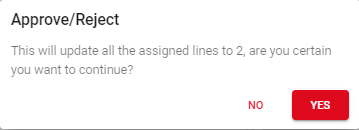
 

 In this case 2 should be the translated to the 'approved’, which means a lot more for the user don't you agree?


4 replies

Mark Jongeling
Administrator
Forum|alt.badge.img+23
  • Software Architect
  • August 21, 2023

Hi Kevin,

DId you happen to mean Message options rather than Elements?

Message options should work properly. Add message options to your comfirmation message and translate these options. This translation should then be shown inside the Universal GUI.


Mark Jongeling
Administrator
Forum|alt.badge.img+23
  • Software Architect
  • August 21, 2023
NewNeeds feedback

Kevin Horst
Thinkwise blogger
Forum|alt.badge.img+5
  • Author
  • Thinkwise blogger
  • August 21, 2023

Hi Mark,

I mean the task parameters in the message text. These are supported in the universal GUI, but for task parameters with a combo domain  it uses the database value instead of the translation of the element.
Which kind of defeats the purpose.


Mark Jongeling
Administrator
Forum|alt.badge.img+23
  • Software Architect
  • August 21, 2023
Needs feedbackOpen