
Next release

Create allowed tenant and login option rows when adding a Web Domain

Related products:Intelligent Application Manager
  • February 10, 2026
  • 14 replies
  • 111 views

Harm Horstman
Superhero
Forum|alt.badge.img+21

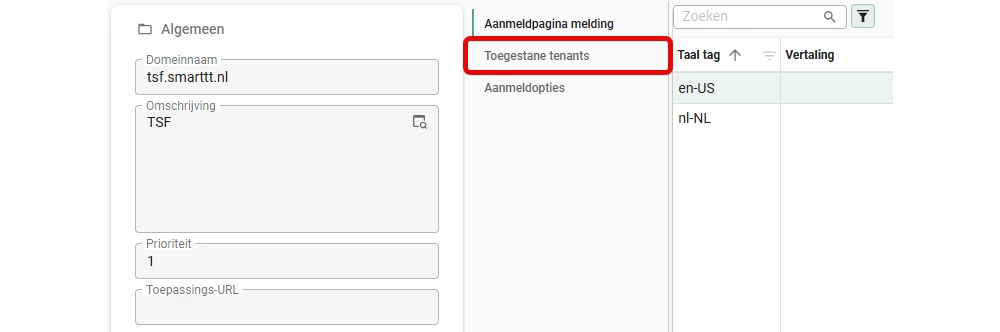
In case only one tenant exists it would help to create default rows in these tables when a web domain is added: 
:

web_domain_allowed_tenant
web_domain_login_option


Else nobody will be abble to open the application and there is no other way to solve the problem via the IAM database



14 replies

Arie V
Community Manager
Forum|alt.badge.img+13
  • Community Manager
  • February 19, 2026

​@Harm Horstman I believe we enforce/ensure this on the Default web domain *, as you can’t delete anything there. If you somehow managed to work around that, please raise a bug in TCP.


Arie V
Community Manager
Forum|alt.badge.img+13
  • Community Manager
  • February 19, 2026
New→Needs feedback

Harm Horstman
Superhero
Forum|alt.badge.img+21
  • Author
  • Superhero
  • February 20, 2026

The problem appears when a specific (sub) domain is created

My work around  was to manually create rows in these tables in the IAM database:
web_domain_allowed_tenant
web_domain_login_option


Arie V
Community Manager
Forum|alt.badge.img+13
  • Community Manager
  • February 20, 2026

I would assume that you should still have been able to login via the Default domain, why wasn’t that working for you?


Harm Horstman
Superhero
Forum|alt.badge.img+21
  • Author
  • Superhero
  • February 20, 2026

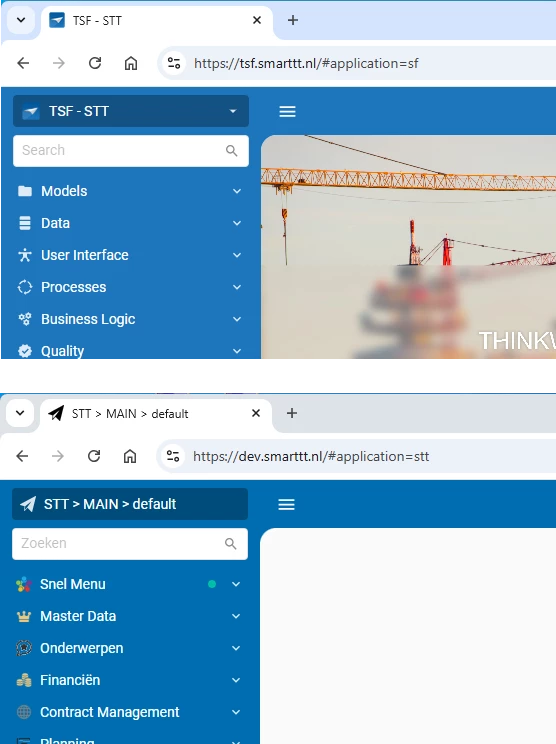
I wanted 2 separate domains to make a difference between TSF and end applications over SF

Example:


I know there is a option in TSF to open the end application, but we have various reasons for having a separate web domain to open the end application. Testing end applications, during development, on mobile devices is one reason.


And I foresee that there can be reasons for having multiple web domains per IAM database in live environments. 


Arie V
Community Manager
Forum|alt.badge.img+13
  • Community Manager
  • February 23, 2026

​@Harm Horstman The example you are giving is served over 2 different Universal UI’s I assume, since one Service URL must be indicium/iam/sf and the other indicium/iam/iam.

Generally speaking the purpose of Web domains is to have different Login screens while only needing to use a single IAM / Indicium / Universal.

Could you still clarify how you got into trouble, since the default domain should always be there as a backup. Was that somehow not reachable anymore?


Harm Horstman
Superhero
Forum|alt.badge.img+21
  • Author
  • Superhero
  • February 23, 2026

The default domain is always there, but will be ignored when you create an extra one with higher priority.

It is easy to forget assigning a tenant, because it is in a detail without focus.


When that happens the application is no longer reachable.


Arie V
Community Manager
Forum|alt.badge.img+13
  • Community Manager
  • February 23, 2026

​@Harm Horstman Alright, so would your Idea imply that when creating a new Web domain, we basically copy the values for Allowed tenants and Login options from the default Web domain?

And then you remove/disable the ones you don’t want to use instead of adding the ones you want to use.


Harm Horstman
Superhero
Forum|alt.badge.img+21
  • Author
  • Superhero
  • February 23, 2026

To make it dummy proof I would create mandatory fields main_tenant_id and main_login_option_id both with a lookup in the the web_domain table and interact with  the detail tables web_domain_allowed_tenant and web_domain_login_option by means of handlers.


Arie V
Community Manager
Forum|alt.badge.img+13
  • Community Manager
  • February 23, 2026
Needs feedback→Open

Arie V
Community Manager
Forum|alt.badge.img+13
  • Community Manager
  • July 26, 2026
Updated idea statusOpen→Planned

Arie V
Community Manager
Forum|alt.badge.img+13
  • Community Manager
  • July 26, 2026

​@Harm Horstman I experienced this issue first-hand with another customer. What I understand now is that when adding a new Web domain that is in fact the same default Web domain as used for login (https://tcp.thinkwise.app/ f.e.), it will effectively lock everyone out of the application because that new Web domain supersedes the default * Web domain.

We’ll aim to implement a solution to this with Release 2026.3!


Arie V
Community Manager
Forum|alt.badge.img+13
  • Community Manager
  • October 2, 2026
Updated idea statusPlanned→Next release

Arie V
Community Manager
Forum|alt.badge.img+13
  • Community Manager
  • October 2, 2026

This will indeed be resolved with Release 2026.3. Web domains will work similar to applications: they are not activated automatically.  

When a main administrator tries to activate a web domain without assigned tenants or login options, IAM blocks this and shows the following message:
'This web domain has not been fully configured. If there are no assigned tenants or no assigned login options, nobody will be able to sign in to the web domain.'