

Open

Controle type for ID columns

Related products:Windows GUI
  • September 22, 2021
  • 4 replies
  • 78 views

Harm Horstman
Superhero
Forum|alt.badge.img+21

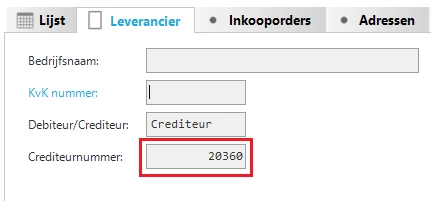
I am looking for a way to align id columns of type integer to the left.

The alignment setting is not working for numeric data types. In the grid it does, but not in forms.

Maybe a special control type for this purpose could be a solution?

Example of current behaviour:
 

4 replies

Forum|alt.badge.img+2
  • Moderator
  • September 27, 2021

Hello Harm,

You can accomplish this with the extended property formalignmentofnumbers. The options are 'left’ and 'right’. For more information about this setting please see its entry in the docs.
I would like to hear if my suggestion answers your question.
 

With kind regards,
Edo Spijker


Harm Horstman
Superhero
Forum|alt.badge.img+21
  • Author
  • Superhero
  • September 27, 2021

Hi Edo,

I am familiar with this setting, but it does not produce the desired effect.

Why is this extended property necessary? Grids just use the alignment setting of the domain, which is perfect.

Also in forms Some numbers should be aligned to the left and others to the right, which is now impossible.

Typical examples:
Align Left: Key values / ID's (like product numbers, employee number, etc...)
Align Right: Quantities, Amounts

Hopefully a solution can be found.

Thanks,

Harm


Forum|alt.badge.img+2
  • Moderator
  • September 29, 2021
Updated idea statusNewOpen

Forum|alt.badge.img+2
  • Moderator
  • September 29, 2021

Hello Harm,

I think this is a good suggestion and the first vote will be mine.

With kind regards,
Edo Spijker