Open

Clear filters on detail when the main row is switched

Related products:Universal UI
  • July 15, 2026
  • 5 replies
  • 34 views

Sometimes you apply filtering to a detail to get a certain result. Then you switch rows on the main list. And go to the same detail but the detail is still filtered on the previously used filtering so you don’t see any rows until you remove the previously used filtering. 
I find this very confusing please clear the filtering on a detail when the main row is switched. 

5 replies

Forum|alt.badge.img+8
  • Captain
  • July 15, 2026

I agree, although there are use cases that break when this would be changed.

Maybe there could be a switch (default = off) on the filter form for detail subjects to ‘lock’ the filter for different rows. 


Arie V
Community Manager
Forum|alt.badge.img+12
  • Community Manager
  • July 24, 2026
Updated idea statusNewOpen

Forum|alt.badge.img

I’m often happy I can re-use the existing filter. 

Perhaps a notification can be shown in the top row to remind the user that a filter is active, especially if the filter returns an empty set?


  • Rookie
  • August 4, 2026

In how we've build our main screens (grid with 'main row'  up top; detail grid and subsequent form below) current behaviour works as intended - since we can quickly move through for example articles (main row) and see only active PO's or all POs if that filter was selected and their respective data.

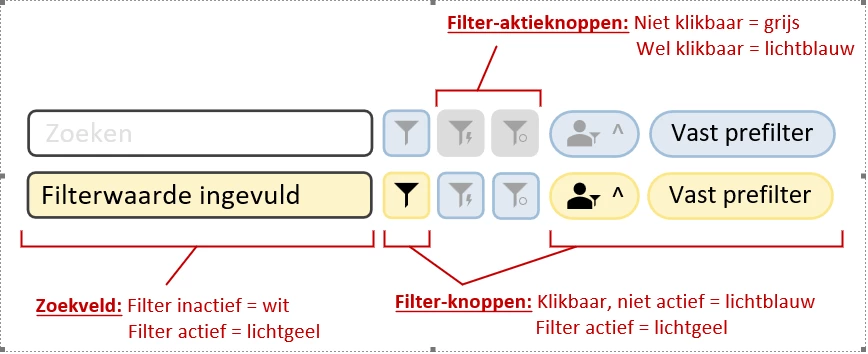
We're using CSS to signal our users that a (pre/user defined) filter is activated. A filter is available but not used = icon is blue. Any filtering has been applied = icon is yellow.


  • Rookie
  • August 4, 2026

In how we've build our main screens (grid with 'main row'  up top; detail grid and subsequent form below) current behaviour works as intended - since we can quickly move through for example articles (main row) and see only active PO's or all POs if that filter was selected and their respective data.

We're using CSS to signal our users that a (pre/user defined) filter is activated. A filter is available but not used = icon is blue. Any filtering has been applied = icon is yellow.