



Open

Automatically set Layout/Default/Context/Badge checkbox in Subject (and other places)

Related products:Software Factory
  • September 18, 2020
  • 2 replies
  • 86 views

Mark Jongeling
Administrator
Forum|alt.badge.img+23

When using the Assigning section in Control Procedures, if the user connects a template to a program object, it automatically sets the Layout/Default/Context/Badge checkbox in Subject → Performance to ON. This also applies for Tasks for example.
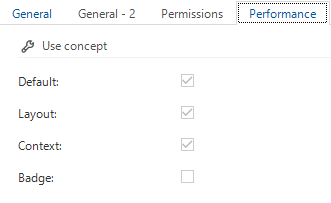
Example

But it does not turn it off when all templates are disconnected from the program object. Nor does it turn On when a template is assigned through the use of a SQL Control procedure or Dynamic model procedure. 

So I would like to see a trigger that will either turn on or turn off the checkboxes in Subject → Performance when a template is connected or all are disconnected. This will prevent procedures from not being used even though the developer intents to.


2 replies

Jasper
Thinkwiser
  • October 14, 2020

The technical reason behind this is that we want to limit the amount of trigger functionality in the Software Factory due to performance and dependency issues in, for example, generation and merging. Instead, we provide validations that check the situations described, also alerting you when something needs to be adjusted or corrected. 

Would it be an option to automatically set these options after generating?  


Mark Jongeling
Administrator
Forum|alt.badge.img+23
  • Author
  • Software Architect
  • October 14, 2020

The technical reason behind this is that we want to limit the amount of trigger functionality in the Software Factory due to performance and dependency issues in, for example, generation and merging. Instead, we provide validations that check the situations described, also alerting you when something needs to be adjusted or corrected. 

Would it be an option to automatically set these options after generating?  

Yes Jasper, that would suffice for me