Open

Automate generation, unit test etc.

Related products:Software Factory
  • October 21, 2022
  • 9 replies
  • 145 views

Robbert van Tongeren
Thinkwise blogger

Having the possibility to use indicium to automate generating / unit test / validation and all is very nice, as found here: https://docs.thinkwisesoftware.com/docs/sf/deployment_automation

I think it would be a great addition the be able to schedule these from within the SF since from there we know the current project / project_vrs and the indicium we need.

We want to schedule unit test and validations every night, it would be nice and quick if we can accomplish this within the SF with a simple click instead of having an external program running a schedule and retrieving the current active project_vrs to run the procedure.


9 replies

Mark Jongeling
Administrator
Forum|alt.badge.img+23

Hi Robbert,

We have this on our backlog and was an idea to implement ever since we refactored the Creation processes to make use of Indicium. The initial idea was to use similar functionality to how developers make schedules for System flows. Thanks for the idea, this will certainly help with the prioritization.


Mark Jongeling
Administrator
Forum|alt.badge.img+23
NewOn the backlog

Arie V
Community Manager
Forum|alt.badge.img+12
  • Community Manager
  • January 2, 2025
On the backlogOpen

Arie V
Community Manager
Forum|alt.badge.img+12
  • Community Manager
  • January 2, 2025

Status updated to better reflect the Status of the Idea with the clarified Statuses as explained in the Reply here: What happens to your ideas? (updated as per november 2024) | Thinkwise Community


Arie V
Community Manager
Forum|alt.badge.img+12
  • Community Manager
  • November 28, 2025
The following idea has been merged into this idea:

All the votes have been transferred into this idea.

Arie V
Community Manager
Forum|alt.badge.img+12
  • Community Manager
  • November 28, 2025

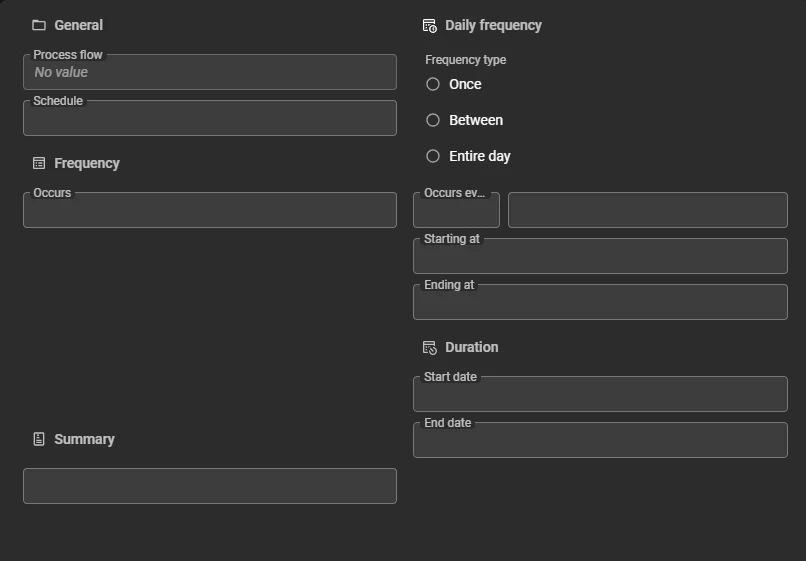
With the recently added Creation presets I feel the only missing link is the capability to ‘Schedule’ Creation instead of immediately Executing it. To what extend would we serve your needs if we add a ‘Schedule’ button to the Creation task which then allows you to enter Schedule details similar to the Process flow schedule settings?

I assume you would also want to be able to include the ‘Sync to IAM’ action, right? For instance to deploy nightly to a separate Test Environment.

Creation task with Creation presets
Process flows > Process schedules


Forum|alt.badge.img+1

Hi Arie, 

Thanks for the response! The scheduling option you describe would definitely move in the right direction, but to clarify our specific use case:

What we really want is the ability to automatically run all unit tests every night on our sprint branch. This ensures that we always know whether a code template change made the previous day has affected the expected outcome of any task, procedure, or other component. Running unit tests after every creation on our sprint branch takes too much time, and sometimes even deadlocks the application on our development environment.

Right now, we achieve this by manually scheduling the Software Factory unit test task through a SQL Server Agent job. It works well, but having native support within the Software Factory itself would make the process easier to maintain.

For this purpose, the key requirement is scheduling the unit test execution itself. Sync to IAM is not needed for our nightly run, since we only want to validate the sprint branch and detect regressions as early as possible.

If a “Schedule” option on the Unit test screen in the SF would allow us to schedule the execution of unit tests in the same way as a Process Flow schedule, that would perfectly serve our needs.

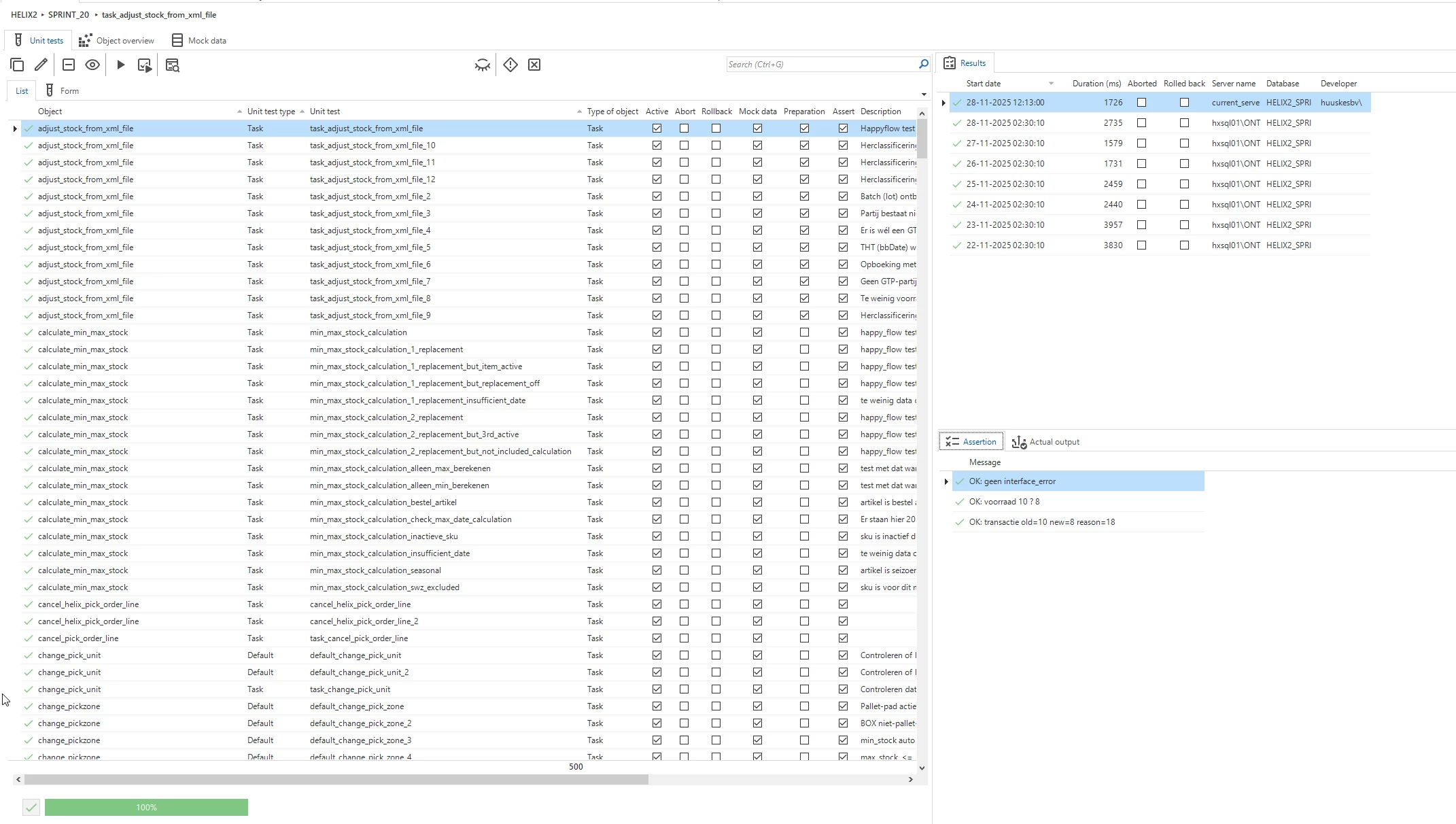
To give you a little more info, These are a few of our unit tests, at this moment in time exactly 500. those are made for the critical parts of our system that always should work the same way.

At the right you can see that every day, at around 02:30 a unit test execution is initiated, we do this for all unit tests that we have.

We do that with the server agent job that just executes the "Execute all unit tests” task.

Adding the option to schedule the "Execute all unit tests” task would fulfill our needs.


Arie V
Community Manager
Forum|alt.badge.img+12
  • Community Manager
  • November 28, 2025

@Mathijn.Smits My suggestion caters for that. You would then create a Custom preset like “Unit Tests” with only the checkbox “Execute all unit tests” enabled and subsequently Schedule it. By going about it this way we offer you any kind of flexibility in (de)selecting Creation steps.

Another example could be that you would like to do a nightly/weekly automated Deploy of your MAIN to a Test environment on which also End-2-End test automation is running to test the latest functionality including Roles & Rights. For this you’d want to do a Sync to IAM too.


Forum|alt.badge.img+1

@Arie V Thanks for your response!

If it's possible to nightly schedule a Creation, but only check the unit tests and for example smoke tests with this feature, that would be an even better and more flexible way to solve this!