Open

Add ignore all errors to execute source code

Related products:Software Factory
  • February 6, 2026
  • 5 replies
  • 41 views

Add ignore all errors to execute source code

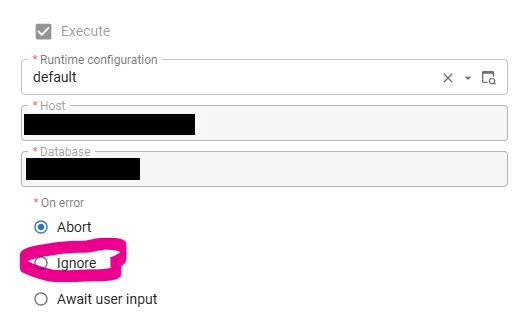
On generate defintion you get the option to ignore all errors. Bon the execute source code you can only ignore 1 error. I already know the problem I just want to create the rest and continue debugging. But there is no option to ignore all errors on this screen. Please add that option here as well. 



5 replies

Arie V
Community Manager
Forum|alt.badge.img+12
  • Community Manager
  • February 19, 2026

@Erwin Ekkel You shouldn’t have errors in your Execute source code in the first place. Could you clarify in what Use Cases this would truly help you?


Arie V
Community Manager
Forum|alt.badge.img+12
  • Community Manager
  • February 19, 2026
NewNeeds feedback

  • Author
  • February 20, 2026

I understand and agree that there should not be errors. 

However, for support we receive models with problems i can not quickly resolve. 
For example the view references an external object that does not exist. The view will fail. But all other views will fail as well, result no views on the database. I already know the view with the problem. I just want to continue debugging my error. Now I have to either create using execute all creation steps or run the code manually. 

Here’s a question for you. Why do we allow ignore errors when running all the steps. But not when you run the last step individually? It seems weird to me to apply different rules to the same action. 

Execute all creation steps:


Arie V
Community Manager
Forum|alt.badge.img+12
  • Community Manager
  • February 23, 2026

@Erwin Ekkel Fair enough, so it’s not consistent at the moment...


Arie V
Community Manager
Forum|alt.badge.img+12
  • Community Manager
  • February 23, 2026
Needs feedbackOpen