On the backlog

Ability to show table tasks on grid line

Related products:Software FactoryUniversal UI
  • July 9, 2019
  • 15 replies
  • 634 views

John Lunenburg
Sidekick
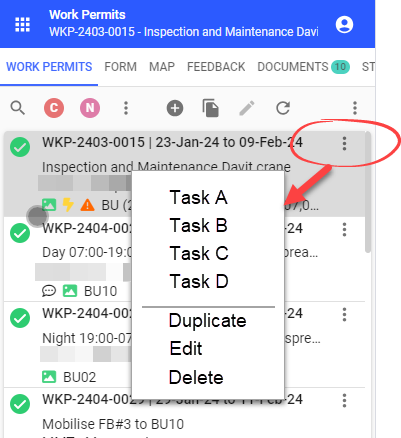
We would like to have the ability to show table tasks on a grid line. This is especially useful for the mobile GUI and when just a couple of table tasks are available.

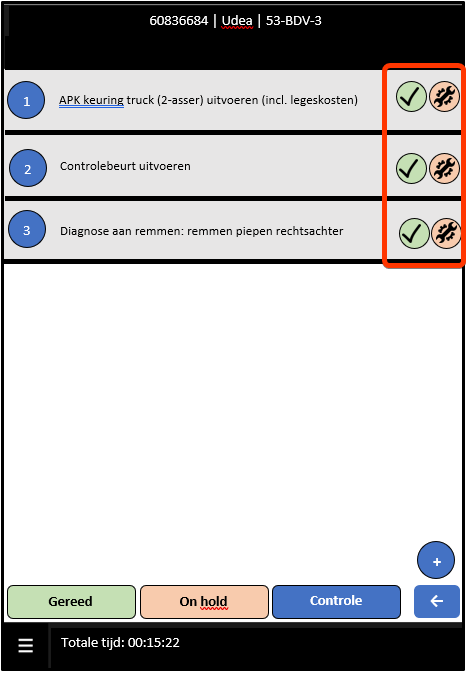
Currently you can show tasks on the top or bottom of a grid in mobile. To start a task for a specific record you should select a line first and then select the concerning task. In the described case it is faster to select the task direct on the line.

See print screens for further explanation.

Task on top of grid (current situation)
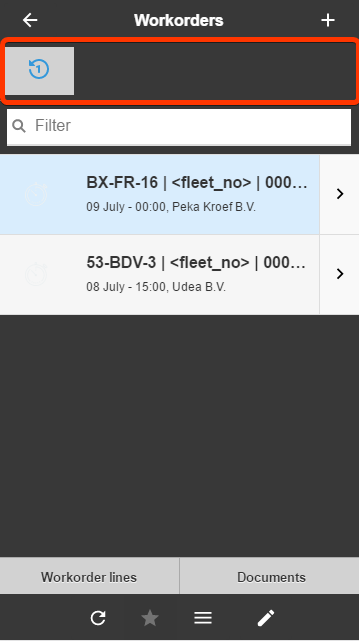
Example tasks on grid line

15 replies

Jasper
Superhero
  • July 12, 2019
Hi John,

Thats a great idea, an we've actually just recently investigated the feasibility to implement this in the Windows and Web GUIs. Unfortunately, the impact was quite big there, but we'll definitely keep this in mind for the Universal GUI.

Jeroen van den Belt
Administrator
Forum|alt.badge.img+10
The following idea has been merged into this idea:

All the votes have been transferred into this idea.

Kasper Reijnders
Forum|alt.badge.img+5

Is there a way to see when an idea gets implemented or whether it is going to be in near or far future? This request is already 3 years old. It feels like a good idea, but I would be interested to know what the actual status is. 


Jeroen van den Belt
Administrator
Forum|alt.badge.img+10

Is there a way to see when an idea gets implemented or whether it is going to be in near or far future? This request is already 3 years old. It feels like a good idea, but I would be interested to know what the actual status is. 

Hi @Kasper Reijnders,

Concerning the first part of your question, an idea is expected to get implemented in the near future when its status is ‘Planned’. Concerning the second part, the moment on which the idea is reported is not so relevant to us as some other factors. For more information, I'd like to refer you to this article where all criteria are explained: 

Concerning this idea specifically, I see that we did not properly update the status for this one. It should be ‘On the backlog’ instead of ‘Open’. I will update it right away. Thank you for bringing this to our attention.

Jeroen


Jeroen van den Belt
Administrator
Forum|alt.badge.img+10
OpenOn the backlog

Arie V
Community Manager
Forum|alt.badge.img+12
  • Community Manager
  • December 18, 2024
The following idea has been merged into this idea:

All the votes have been transferred into this idea.

Harm Horstman
Superhero
Forum|alt.badge.img+21

Hopefully you can create some sort of overlay menu that works for both the rows in a grid and the rows in a card list.


It should be possible to indicate which tasks should be visible in the action bar and which in the overlay menu at row level. 


Arie V
Community Manager
Forum|alt.badge.img+12
  • Community Manager
  • October 18, 2025
The following idea has been merged into this idea:

All the votes have been transferred into this idea.

Arie V
Community Manager
Forum|alt.badge.img+12
  • Community Manager
  • November 14, 2025
The following idea has been merged into this idea:

All the votes have been transferred into this idea.

Bart Metselaar
Moderator
Forum|alt.badge.img+3

Actions in grids and cardlists

We want to let developers place actions inside grids and cardlists, directly next to the data they act on. 

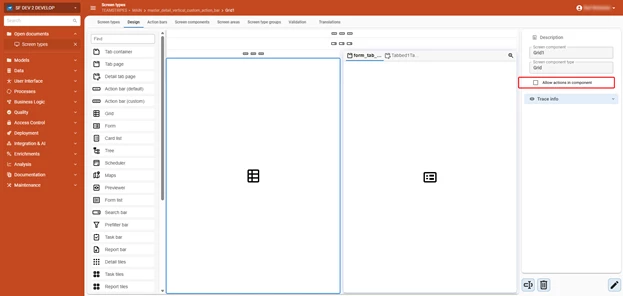
Enabling this will be straightforward. In the subject settings, check a single option to allow a grid or cardlist component to show actions. That component then becomes available in the Action Bars tab, where you configure it just as you would at a regular action bar.

As these actions will be row specific, we are only going to offer Tasks, CRUD actions and Reports on rows.

Simply enable ‘Allow actions in component’ in the screen type modeler.
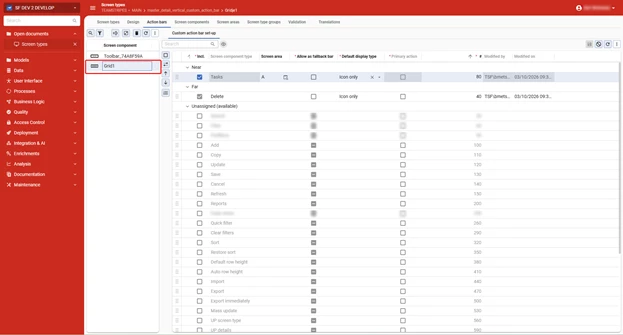
And set up the actions in the action bar screen. the Near and Far settings then determine the placement of the actions in the component.

What will actions in context of the record look like?

We want to keep the look and feel consistent with that of the buttons shown in the action bar. This makes them instantly recognizable as functional elements for your users.

Grids

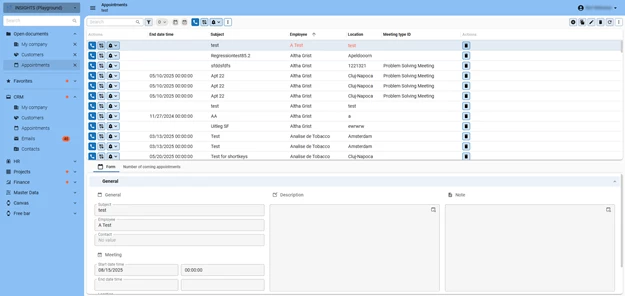
For Grids, the actions can be shown in a dedicated Action column, where the Near setting would set up an Action column as the first column of the grid, and the Far setting would then place an action column as the last column of the grid.

Actions presented as the first and last column of the grid, based on the settings above

There are considerations to take into account:

  • Based on the button size, the grid rows will have a default minimum height of 30px.
  • Alignment of actions will always be to the left
  • Action columns will not be available as reachable elements in the subjects settings, they are to be considered as dummy columns, only for action button visualization.
  • The width of the Actions column is based on the amount of buttons shown within them

Cardlists

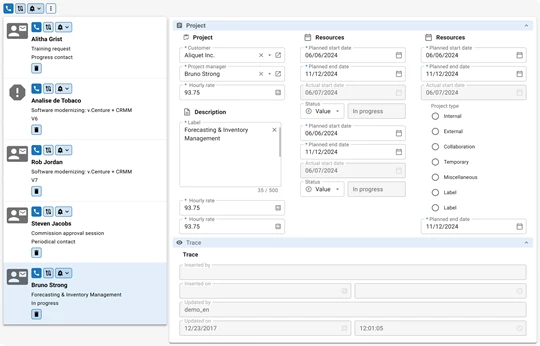
In Cardlists, the actions will be placed at the top (Near) and/or bottom (Far) of a card.

Actions presented at the top and bottom of each cardlist item

General considerations:

  • Row actions only apply to the selected row
    • Multiselect is ignored when using a row action. Multi-row operations remain the responsibility of the (Custom) Action Bars.
  • Performance will be affected when taking Context and Layout procedures into account. That is why actions on Grid line and Cardlist don’t evaluate Context and Layout procedures. 

Gesture interactions

We're also exploring this idea about swipe gestures for touchscreen environments. For grids and card lists, users would swipe left or right on a row to reveal its actions. The Near/Far configuration determines which actions appear on which side.

We want to know your opinion

With these settings, you’ll have a great set of tools to bring actions closer to the context where the user needs and expects them, making your applications more intuitive, flexible and user friendly.

We welcome your feedback about these ideas, so let us know what you think!


Forum|alt.badge.img+8
  • Captain
  • March 20, 2026

I am not really happy about the current limitations. I would at least expect the buttons to evaluate the layout/context of the selected row. Also having to sacrifice grid height is a bit of a pity after we just switched to lower heights now that it is supported with edit in grid.

Ideally we would like to be able to place specific tasks behind (or in) specific columns in a grid. So for the user it is clear the task interacts with the object in the column.

As for layout, the buttons draw away quite some attention right now, maybe it could be a bit more subtle? For example that the blue box only is visible on hoover or on the selected row.

Considering "The width of the Actions column is based on the amount of buttons shown within them" there still seems a lot of white space in the action column behind the buttons of your grid screenshot.

To end with a positive note, I do see a nice use case of this feature to add multiple rows in link-tables by making a add-task that opens a fake-lookup screen in which each row has an 'Add' task button in front. This way a user could add multiple rows from one lookup window in an intuitive manner (https://community.thinkwisesoftware.com/ideas/adding-multiple-rows-at-once-through-a-lookup-6653). 


Harm Horstman
Superhero
Forum|alt.badge.img+21

A great development if tasks and actions can be executed at row level. This will really help enduser adoption of applications.

However, I do have some considerations:

  • The tasks should be presented in a more subtle way.
  • In grids, I would show the tasks only on the active row, ideally layered on top of the row’s content, so the underlying data remains scrollable.
  • In card lists, it would be very useful to place the tasks inside an overflow menu. This keeps the interface clean while still allowing task names to remain visible when opened.
  • The overflow‑menu button in the card list should also be shown only on the active card.
  • An additional advantage of showing tasks or overflow‑menu buttons only on the active card is that it becomes immediately clear to the user which card is currently active.
    This keeps the focus on the card’s data and ensures optimal use of limited screen space on smaller devices.
  • A possibility of swipe menu functions, would be great. A default swipe-down to refresh the data in a cardlist would also be nice.

Arie V
Community Manager
Forum|alt.badge.img+12
  • Community Manager
  • March 20, 2026

@PeterKeeris ​@Harm Horstman Thanks for your feedback, let’s continue the conversation to get to an even better solution together! A few things I’d like to check related to your comments:

As for layout, the buttons draw away quite some attention right now, maybe it could be a bit more subtle? For example that the blue box only is visible on hoover or on the selected row.

  • The tasks should be presented in a more subtle way.
  • In grids, I would show the tasks only on the active row, ideally layered on top of the row’s content, so the underlying data remains scrollable.

Only showing the Actions for the selected record would solve both the Context & Layout performance challenge and the visual clutter challenge. In return, this would however mean that you effectively need 2 clicks to initiate an Action on a different records: first select the Record, then click the now-visible Action. That would be very similar to the Lookup hyperlink behavior. Would you be fine with that?

We’ll consider displaying the ‘On hover’ and the Cardlist overflow options, but since Context & Layout are only evaluated for the Selected row, the ‘On hover’ would then only have an effect on the Selected row.


Ideally we would like to be able to place specific tasks behind (or in) specific columns in a grid. So for the user it is clear the task interacts with the object in the column.

This is an interesting angle to explore as well! Rather than having multiple Tasks at the start or end of a Grid row based on the Action bar concept, this would be more of an extension to the Task Double click column feature. If I understand you correctly, you are basically proposing a different way of visualizing such a Double click task, effectively allowing to visualize it and single-click it in/near the linked Grid column. Is my understanding correct?


Forum|alt.badge.img+8
  • Captain
  • March 20, 2026


​ Only showing the Actions for the selected record would solve both the Context & Layout performance challenge and the visual clutter challenge. In return, this would however mean that you effectively need 2 clicks to initiate an Action on a different records: first select the Record, then click the now-visible Action. That would be very similar to the Lookup hyperlink behavior. Would you be fine with that?


I think it is dependent on the use case. Would it be an option to make this configurable for the developer?
 

What about if all actions are shown as disabled on non-selected rows? Selecting the row executes the layout+context and makes the buttons active. This way a user could double click on a button of a non-selected row and it would still work (first click activates the row, second click executes the task).
Note: If the context hides a button, it should make all other buttons stay in the same place to prevent the user from clicking the wrong button.


This is an interesting angle to explore as well! Rather than having multiple Tasks at the start or end of a Grid row based on the Action bar concept, this would be more of an extension to the Task Double click column feature. If I understand you correctly, you are basically proposing a different way of visualizing such a Double click task, effectively allowing to visualize it and single-click it in/near the linked Grid column. Is my understanding correct?


Yes, exactly. It would make it more intuitive for the user and add the option to use multiple tasks for the same column.


Harm Horstman
Superhero
Forum|alt.badge.img+21

 @Arie V I believe this is logical behavior, it costs one extra click, but makes it very clear for end users

On hover could bet nice, but does not work for touch-screen, so I would avoid the use of that in this case